
LinkedIn Post Generator
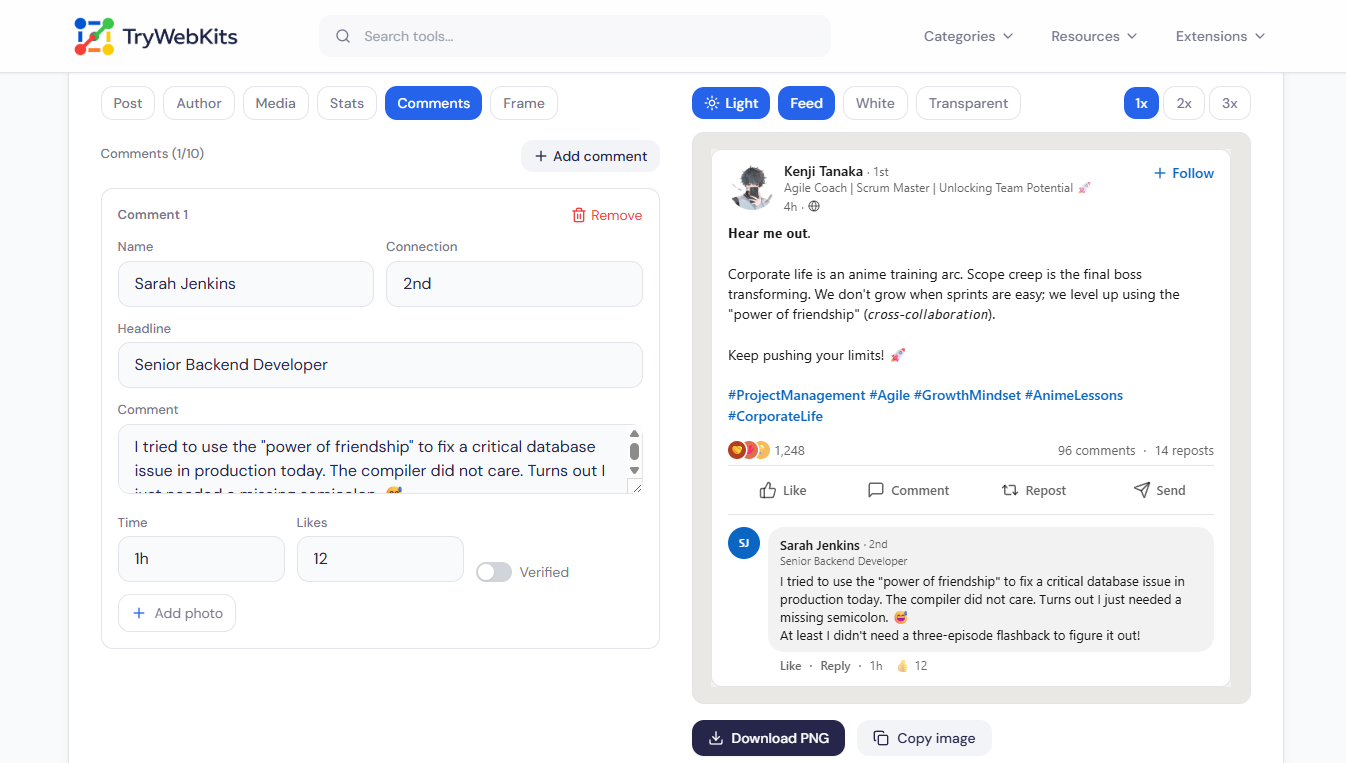
Design a realistic LinkedIn post, add a phone frame with an editable status bar, and download it as an image.
About This Tool
The LinkedIn Post Generator builds a realistic preview of a LinkedIn post directly in the browser. It turns a few text fields and an uploaded photo into a clean mockup that closely matches the real feed. Every detail can be adjusted without a design tool, an extension, or an account, and the finished post exports as an image in seconds. The result suits sharing examples, planning content, building post templates, or keeping a quick screenshot before publishing. It behaves the same on desktop, laptop, tablet, and phone, and stays free to use with no sign-up required.
How To Create A Fake LinkedIn Post?
Building a post mockup takes only a few quick steps.
- 1
Edit the name, headline, photo, and post text in the editor panel.
- 2
Add images or a video, then set reactions, comments, and repost numbers.
- 3
Pick light or dark mode, and add a phone frame if needed.
- 4
Download the finished post as a PNG, or copy the image directly.
Who Uses LinkedIn Mockups?
A LinkedIn post mockup is useful well beyond a single screenshot.
Content Creators And Marketers
Preview how a caption and hashtags will look before posting for real.
Designers And Agencies
Drop a believable LinkedIn post mockup into pitches, slides, and case studies.
Educators And Trainers
Build sample posts to teach social writing without exposing real accounts.
Writers And Meme Makers
Craft a fake or cringe LinkedIn post for parody, examples, or a joke.
Job Seekers And Founders
Test an inspirational or viral post idea and gather feedback before publishing.
Recruiters And HR Teams
Share polished post examples with candidates or build templates for employer branding.
Smarter Features For Better LinkedIn Mockup
The generator controls every part of a LinkedIn post mockup.
Profile Controls
Name, headline, photo, verified badge, and connection degree are all fully editable.
Paste-Ready Formatting
Bold, italic, and monospace styling holds up after pasting into a real LinkedIn post.
Media Layouts
Add up to twenty photos in LinkedIn-style collages, or drop in one video clip.
Engagement Numbers
Set reactions, comment totals, and repost counts to match any audience size.
Editable Status Bar
Set the clock, battery percentage, and charging state for a believable phone screenshot.
Signal And Network
Toggle Wi-Fi, choose signal strength, and switch the network from 5G to 3G.
Feed Realism Touches
Show the "Promoted" ad label and the "…more" cut-off that long posts get.
Instant Image Copy
Copy the post as an image and paste it straight into chats, slides, or docs.
Transparent PNG Export
Save with no backdrop so the post drops cleanly onto any slide or design.
Comment Threads
Add up to ten replies, each with its own name, photo, and likes.
Live Profile Initials
When no photo is added, the avatar fills with the name’s initials automatically, like the real feed.
Frames And Export
Wrap the post in an iPhone or Android frame, then save a crisp PNG.
Common LinkedIn Post Mistakes
Faking a believable post by hand goes wrong in predictable ways.
Manual Screenshot Edits
Fonts and spacing rarely line up, and the mismatch gives the fake away.
Hand-Typed Numbers
Figures pasted over an image look flat and break whenever details change.
Empty Profile Details
A missing headline or photo leaves the post looking empty and clearly staged.
Re-Cropped Exports
Screenshots turn soft, so the final shared image quickly reads as low quality.
Usage Policy
This site is not responsible for post images produced by its users. By using our LinkedIn Post Generator, every user agrees to act lawfully and ethically, including, but not limited to, complying with these rules:
- Generated LinkedIn post images must never be used to harass, attack, threaten, slander, disparage, intimidate, or otherwise hurt any person, company, or entity.
- Generated posts must never spread false information that could damage anyone's career, reputation, or business in a negative way.
- Created posts must not be presented as fact or attributed to real professionals as genuine statements. The intent of the tool is parody, demos, and mockups, not misleading anyone.
- It must be made obvious to viewers that any post created here is not an original or genuine screenshot.
Data Security
Everything runs inside the browser. Uploaded photos and video are read on the device and are never sent to a server. The post text and basic settings are stored locally, so a draft can reload on the next visit, while images and video are never kept after the tab closes. Nothing is tracked or shared at any stage.
Frequently Asked Questions
Yes. It is completely free with no account or watermark, and there is no cap on how many mockups can be made.
No. It only creates a preview image and never connects to LinkedIn, signs in, or publishes anything. The result is a mockup, not a live post.
Up to twenty photos and ten comments can be added to a single post, which covers most realistic feed layouts.
Three options are available: the standard feed colour, plain white, or a transparent background for placing the post over any design.
Yes. The clock, battery level, signal bars, Wi-Fi, and network type can all be set to make a screenshot look genuine.
You May Also Like

Bionic Reading Converter
Improve reading speed & concentration by converting any text into Bionic Reading format

QR Code Generator
Create QR codes for URLs, text, WiFi, and more

Typing Speed Checker
Test and improve your typing speed with real-time WPM tracking
Word Counter
Word and character counter with detailed text metrics.

Number Picker Wheel
Spin to decide! A customizable random number & name picker for raffles, games, and fair draws.
