
Instagram Long Comment
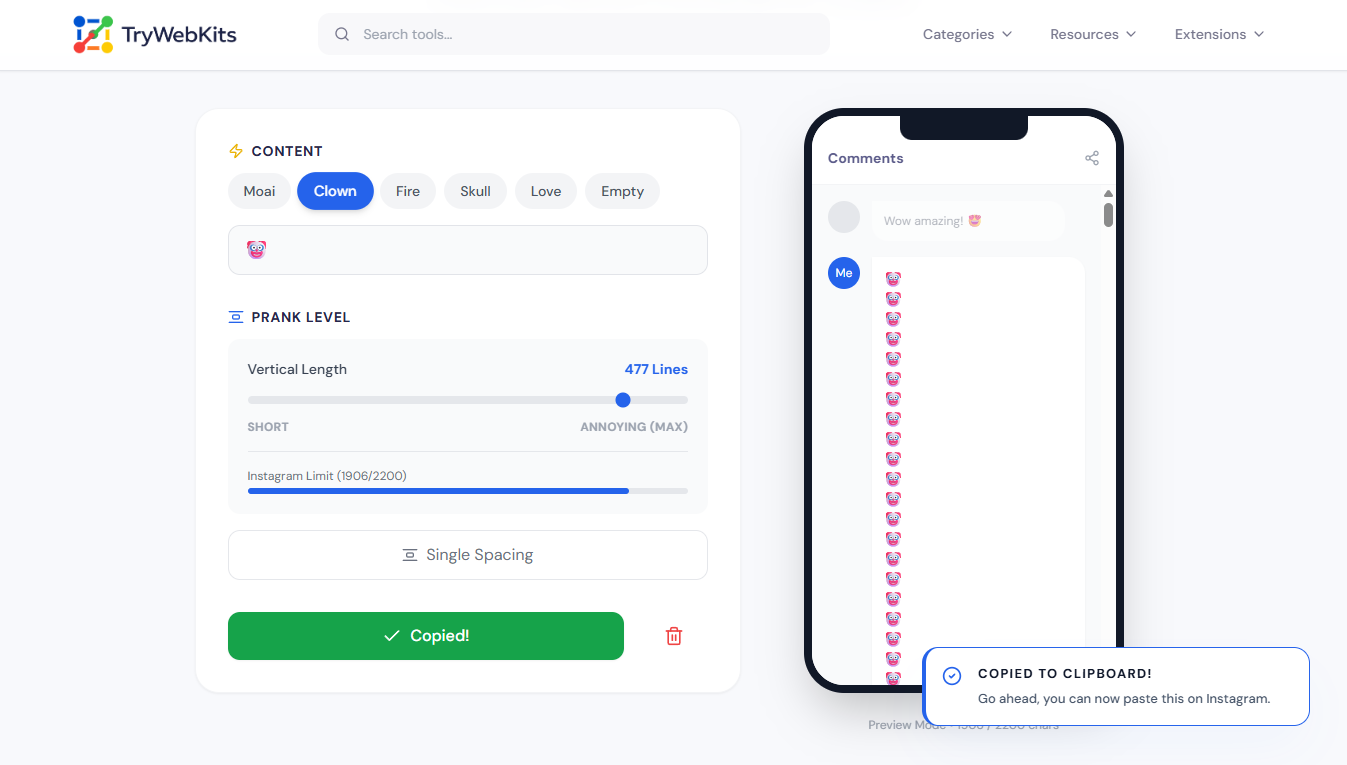
Create infinite-scroll comments that take over the screen.
Preview Mode • 198 / 2200 chars
Instagram Long Comment
This utility generates screen-filling text/emojis blocks designed for social media platforms. When pasted into Instagram, TikTok, or Facebook, the length of the comment forces the text box to expand, creating a scrolling effect that captures attention. It is a simple utility for users who need extended text without manually typing thousands of characters. The output is clean, copy-paste ready, and works across all devices and platforms.
How to Create Infinite Scroll Text?
Creating a long comment that scrolls takes only a few seconds. Follow these simple steps to generate:
- 1
Select a quick preset text or type custom content into the input field.
- 2
Drag the slider to adjust the vertical length up to 550 lines.
- 3
Monitor the character limit bar to ensure it stays under 2200 characters.
- 4
Click the copy button to save the generated text to the clipboard.
- 5
Paste the text directly into the instagram comment field.
Best Times to Post Long Comments
Posting long comments is most effective when engagement is high. Aim for the first 30 minutes after a popular account posts to ensure visibility before the thread fills up. For Instagram, weekday mornings (8 AM – 10 AM local time) and evenings (7 PM – 9 PM) typically see high activity. For TikTok, late afternoons and weekends work best. The goal is to post while the "Newest First" sorting still shows recent activity.
Quick Demo
See how it works in under 14 seconds.
Key Features
The tool offers several practical features for creating long comments quickly
Smart Compression
Uses an invisible anchor character to maintain new lines while saving valuable space
Limit Checker
Automatically stops generating at 2200 characters to prevent app rejection
Instant Rendering
Generates hundreds of lines instantly without causing the browser to freeze
Quick Emoji Presets
Includes popular options like moai, clown, fire, skull, and love
Double Spacing Toggle
Adds extra blank lines easily to increase the overall scroll length
Mobile Preview
Displays exactly how the text will appear on a real mobile screen
Practical Use Cases
People use this tool in various situations where standard comments are not enough. Here are the most common scenarios
Prank Friends
Pranking friends by filling their entire screen with a massive text wall
Hide Messages
Triggering the 'Read More' button to hide secret messages at the bottom
Stand Out
Creating highly visible engagement blocks to stand out in a crowded feed
App Testing
Testing app scrolling limits using a massive instagram scrolling comment
Why Use Our Tool?
Typing long comments manually takes too much time. This tool makes the process faster and easier
Prevents Rejected Comments
The generator automatically stops at 2200 characters to ensure successful daily posting
Copy Paste Ready
Provides a one-click long comment copy paste feature for immediate social media use
Beats Manual Typing
Typing manually fails because social platforms automatically delete standard empty space characters.
Still Have Questions?
Instagram caps replies at roughly 2200 characters. This generator automatically stops right before that limit, ensuring the app accepts the massive text block without any posting errors.
No. Instagram allows long text in comments. This tool simply creates text faster. It does not violate terms of service.
Yes. The text works in any comment box including TikTok, Facebook, and YouTube.
Custom emojis or text can be typed directly into the input box. The tool also provides quick presets like fire, clown, and skull for instant viral generation.
Yes, generating massive screen-filling text pushes older replies down. Followers will only see the top portion and a 'Read More' link, making it perfect for standing out online.
Around 150 lines or more usually creates the scrolling effect. The tool handles this automatically.
You May Also Like

Invisible Character
Copy and paste blank text and invisible character for Instagram, games, and more.

Upside Down Text Generator
Flip text upside down or reversed for social posts, comments, and informal content.

Stylish Game Name Generator
Generate unique usernames for PUBG, COD, and more.

YouTube Thumbnail Downloader
Download high-quality YouTube video and Shorts thumbnail instantly.
