
TikTok Post Generator
Build a realistic fake TikTok profile and post mockup with a caption, sound line, comments, and a phone frame, then download it as an image.
The small spinning disc icon and the sound line sit above the caption, matching TikTok's own layout.
The preview is the export, what you see here is exactly what saves.
About This Tool
A real TikTok profile and its posts only exist inside the app, which makes a fake TikTok profile or post awkward to put together for a mockup, a joke, or planning material. This TikTok post generator builds the same paused-video layout TikTok itself uses, complete with an editable handle, avatar, and verified badge, plus a caption block, action rail, sound line, and comment drawer, from values typed into a form, then turns the finished result into a downloadable PNG. The whole preview renders locally: nothing typed or uploaded ever reaches a server.
How To Make A Fake TikTok Post?
Here are the steps from a blank form to a downloadable mockup.
- 1
Set the handle, profile photo, and verified badge on the Profile tab.
- 2
Write the caption with hashtags, then pick a cover image or gradient.
- 3
Set the sound line, build pinned comments and replies, and set the counts.
- 4
Optionally add an iPhone or Android frame with an editable status bar.
- 5
Toggle Comments Open to preview the comment drawer, then download the PNG.
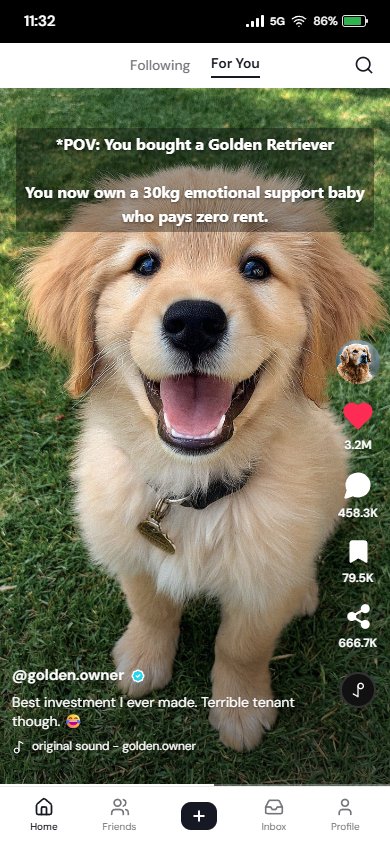
Quick Demo
A short walkthrough of building a fake TikTok post.
How To Tell If A TikTok Post Or Screenshot Is Fake?
A few checks separate a real paused-video screenshot from a generated mockup.
Search The Handle
Searching the exact handle directly on TikTok quickly shows whether that account actually exists.
Check Engagement Ratios
Genuine viral posts rarely show a wildly mismatched like and comment count.
Look At Font And Spacing
The app keeps spacing and icon placement consistent; hand-edited fakes often drift slightly off.
Check The Sound Credit
A missing or oddly worded sound line is a common giveaway on an edited mockup.
Watch For Reused Templates
The same fake layout sometimes resurfaces with new text, catchable with a reverse image search.
Look For The App Frame
A real screenshot usually includes the phone status bar and the app's own top and bottom bars.
Features That Are Lowkey Better
Explore the customization options available for creating TikTok-style posts.
Matches Real TikTok
Caption block, action rail, sound ticker, and progress bar follow the current app layout closely, for a convincing fake TikTok post.
On-Screen Text Overlay
Add a short caption-style overlay across the video area, the way real TikTok clips often use it.
Pinned Comments
Mark one comment as pinned by the creator, shown first in the comment drawer with its own badge.
Comments Open View
Switch the preview to the comment drawer overlay instead of the plain video post in one click.
Gradient Or Custom Cover
Pick from five gradient covers, or upload a real thumbnail image instead.
Fixed-Size Export
The downloaded image comes out the same size every time, regardless of the device used.
Common Mistakes To Avoid
Small details that separate a convincing fake TikTok post from an obvious one.
Forgetting The Verified Badge
Leaving it on for a handle that clearly would not be verified undercuts an otherwise convincing fake TikTok profile.
Leaving Default Sample Text
A caption or username still showing the placeholder default gives away an unedited mockup instantly.
Overcrowding The Caption
Real TikTok captions are usually short; a caption stuffed with too much text tends to read as staged.
Not Previewing Comments Open View
Skipping a check of the comment drawer can leave a placeholder reply or an odd pin choice visible in the final export.
Skipping The Status Bar Details
A battery, signal, or time value left at its default is often the first thing a careful viewer notices.
Using The Wrong Frame For The Platform
An iPhone frame paired with Android-style icons, or the reverse, breaks the illusion immediately.
Why Use Our Tool?
A faster, simpler way to build a convincing mockup.
Faster Than Manual Editing
Build a convincing post mockup from a form instead of retouching a real screenshot by hand.
No Design Skills Needed
Layout, spacing, and icon placement are handled automatically, with nothing to align by hand.
Every Detail Stays Editable
Counts, caption, comments, and the sound line stay fully editable, never locked to a template.
Nothing To Install
Runs as a normal web page in any modern browser, with no extra software needed.
Usage Policy
TryWebKits is not responsible for any images generated by users. By using this tool, you agree to:
- Never use generated posts to harass, defame, threaten, or impersonate a real person or account.
- Never present a generated post as a genuine TikTok screenshot to spread misinformation.
- Make clear to viewers that the image is a mockup, not a real TikTok post.
Common Questions About This TikTok Post Generator
Yes, the TikTok Post Generator is free, with no watermark and no sign-up required.
No. The whole preview renders and exports to an image inside the browser; nothing typed or uploaded reaches a server.
No. It builds a still image mockup of a paused TikTok post, not an actual video file.
Yes. Both the profile photo and the video cover accept an uploaded image, replacing the automatic colored avatar or gradient.
Yes, matching how TikTok itself only ever shows one pinned comment per post.
Yes. Whatever the preview shows, plain post or comment drawer, is exactly what the PNG export saves.
Yes, for jokes, mockups, and illustration. Presenting it as a real screenshot, or using it to harass or impersonate someone, is not allowed.
You May Also Like
Instagram Post Generator
Create a realistic Instagram post, reel, or carousel mockup and export it as an image.

Instagram Story Generator
Create a realistic Instagram story mockup from the viewer or owner side and export as an image.

Fake Tweet Generator
Create realistic fake tweets instantly for pranks or memes.

Instagram Long Comment
Copy viral, infinite-scroll vertical comments to prank friends in Instagram comments section.
