SRT to TXT Converter
 SRT to TXT Converter
Strip timestamps and formatting from an SRT subtitle file, leaving clean, plain text: a free SRT to text file converter that runs in the browser.
SRT or plain text, no size limit
About This Tool
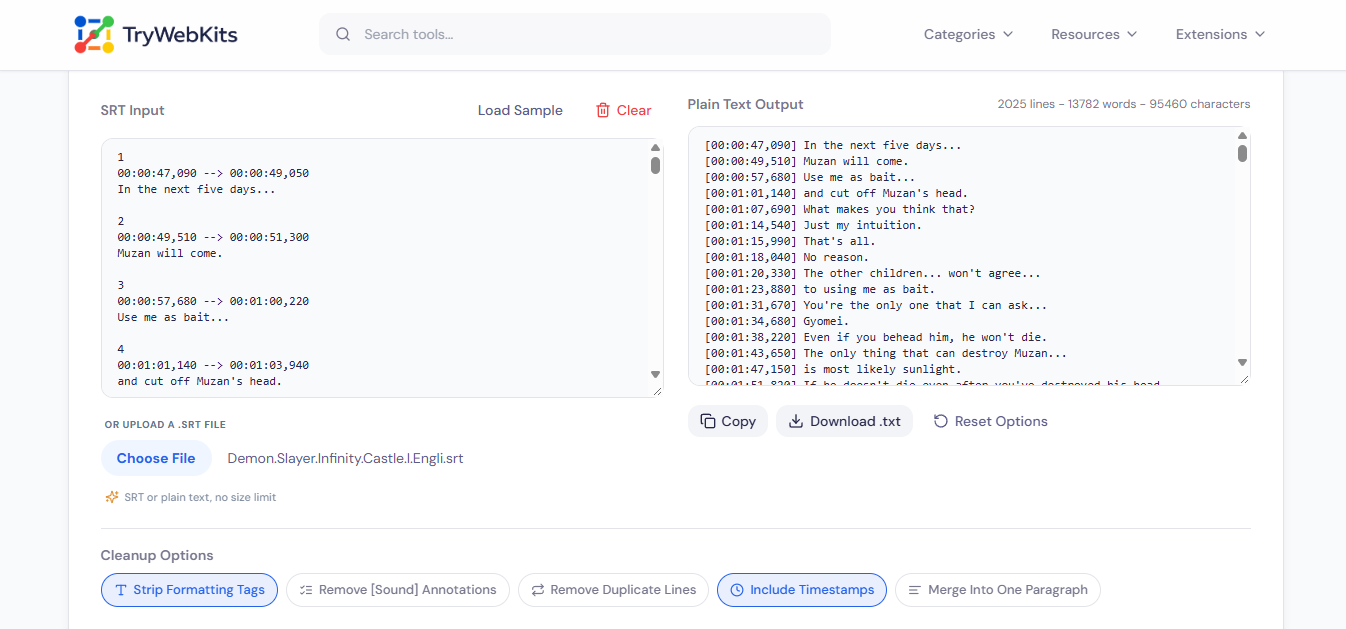
This SRT to text file converter turns a SubRip subtitle file into clean, readable plain text: the sequence numbers and timestamps that every SRT block starts with are stripped away, leaving just the spoken lines behind. Formatting tags, bracketed sound cues, and the repeated lines auto-generated captions often leave behind can each be cleaned up with a toggle, so the converted text file reads like a transcript, not a raw subtitle dump.
Everything runs locally in the browser: a pasted block of SRT text or an uploaded file is parsed on the device, and nothing is ever sent to a server.
How To Convert SRT To Text?
Three steps from a subtitle file to a clean transcript.
- 1
Paste SRT text into the input box, or drop in a .srt file.
- 2
Turn cleanup options on or off to shape the output.
- 3
Copy the result, or download it as a .txt file.
Core Functionalities Of Our SRT To TXT Converter
Tags Stripped By Default
Italic, bold, and color tags common in subtitle files are removed automatically.
Sound Cue Removal
Bracketed cues like [Music] or [Laughter] can be stripped out with a single toggle.
Duplicate Line Cleanup
Optionally collapse the repeated lines that auto-generated captions often leave behind.
Optional Timestamps
Keep a short time marker on every line for a readable, searchable transcript instead of plain prose.
Two Output Shapes
Switch between one line per subtitle or one continuous merged paragraph.
Paste Or Upload A File
Drop in an SRT file directly, or paste the raw text straight into the box.
Frequently Asked Questions
No, it only converts SRT to plain text, in one direction. VTT files and text-to-SRT conversion are not supported.
The timestamp pattern accepts a comma or a period before the milliseconds, so VTT-style stamps are read correctly even though the file is still handled as SRT. A full .vtt file with cue settings is not supported.
No, one file or pasted block is handled at a time. Paste or upload the next one after copying or downloading the current result.
Sound Cue Removal strips bracketed cues like [Music] from the text. Duplicate Line Cleanup removes a line that repeats right after itself. The two can be used together or separately.
No hard limit is enforced, though extremely large files take a moment longer to parse since everything runs on the device.
You May Also Like
Word Counter
Word and character counter with detailed text metrics.

Text Compare Online
Compare texts or files with our side-by-side diff checker.

Text to PDF
Write or paste formatted text and images, then download as PDF, privately in browser.

Text Case Converter
Convert text between uppercase, lowercase, title case, and more

QR Code Generator
Create QR codes for URLs, text, WiFi, and more

CSV Viewer Online
View, search, edit and analyze CSV files and spreadsheets directly in browser.
