
Snapchat DM Generator
Make a fake Snapchat chat with saved messages and screenshot notices.
Live preview · 100% · 1179px wide PNG
About This Tool
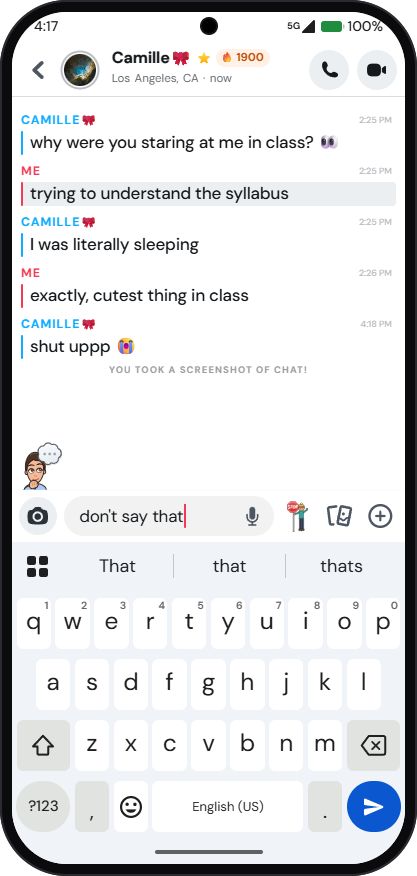
The Snapchat DM Generator makes a fake Snapchat chat for memes, mockups, design previews, and presentations, with no real account involved. It works as a fake Snapchat message generator: every line can be written, assigned to either speaker, and given its own time, and the chat follows the real app layout with a colored sender label, a color bar beside each line, and grey highlights for saved messages.
Photo and video snap cards, large emoji-only messages, and centered screenshot or screen recording notices can be added too. The same conversation previews on an iPhone screen, an Android screen, or a desktop browser window, with an optional on-screen keyboard and typing indicator, and downloads as a high-resolution image.
Build realistic Snapchat chat screenshots, customize every detail, then download the image.
How To Make A Fake Snapchat Chat Screenshot?
Making a fake Snapchat DM online takes only a few minutes from start to finish.
- 1
Pick an iPhone, Android, or desktop screen, and a Light or Dark theme.
- 2
Set the contact name, the line under it, and the status bar details.
- 3
Add messages and choose who sent each one.
- 4
Mark messages as saved, add snaps, or insert a screenshot notice.
- 5
Switch the keyboard, typing indicator, and phone frame on or off.
- 6
Download the image or copy it to the clipboard.
How To Tell If A Snapchat Chat Screenshot Is Fake?
A few checks separate a real chat screenshot from a generated mockup.
Check Sender Colors
Each speaker keeps one colored name label and matching bar, so mixed colors suggest editing.
Read The Timestamps
Times should move forward in order, so a jump backward points to editing.
Study Saved Highlights
Grey highlights mark saved messages only, so a grey block on every line looks staged.
Compare Status Bars
Battery, signal, and time details should match the device style and the claimed moment.
Inspect Screenshot Notices
Notices such as screenshots follow set wording, so oddly worded ones deserve a closer look.
Ask For Proof
A still image proves little, so ask to see the live chat instead.
Features Of The Fake Snapchat Chat Generator
Create realistic Snapchat chats with customizable messages, notices, and devices.
Real Chat Layout
Colored sender labels, color bars, and timestamps follow the real Snapchat chat screen.
Saved Highlight
Mark any message as saved to show the grey highlight used in real chats.
Screenshot Notices
Add screenshot and screen recording lines with any count or custom text.
iPhone & Android
Switch status bar, keyboard, and navigation styles, with an optional phone frame.
Desktop Browser View
Preview the chat inside a Snapchat for Web style browser window.
Keyboard & Typing
Show the on-screen keyboard, a draft message, and a girl or boy typing indicator.
Photo & Video Snaps
Mark snaps as new, opened, or replayed with the matching colored icon.
HD Export
Save at 1x, 2x, or 3x with no watermark, or copy the image directly.
Common Mistakes To Avoid
Small details that make a mockup look unfinished or staged.
Leaving Sample Text
Default sample names or messages left in the editor make a mockup look unfinished.
Unrealistic Timestamps
Times that jump backward or never change across a long chat look staged.
Saving Every Message
Marking nearly every message as saved looks unnatural, since few lines are kept.
Hiding The Mockup
Passing a mockup off as a real chat breaks the usage policy and misleads viewers.
Why Use Our Tool?
Built for quick mockups that follow the real chat layout.
Side-by-Side Preview
A live screen sits beside the editor, so every change shows instantly.
Authentic Snap Cards
Solid and outlined snap cards match the colors real Snapchat uses.
Precise Timing
Set exact times per message, since clumsy timestamps expose most prank screenshots.
No Editing Software
Skip Photoshop layers and font matching, as the layout already mirrors a real screen.
Emoji Reactions
Drop a reaction under any message, and emoji-only messages show at a larger size.
Two-Speaker Control
Swap the sender per line and reorder messages without redrawing anything.
Usage Policy
This site is not responsible for chat images produced by its users. By using the Snapchat DM Generator, every user agrees to act lawfully and ethically, including, but not limited to, complying with these rules:
- Generated chat screenshots must never be used to harass, attack, threaten, slander, disparage, intimidate, or otherwise hurt any person or entity.
- Generated conversations must never spread false information that could affect anyone's life in a negative way.
- Created chats must not be presented as real exchanges. The intent of the tool is harmless fun and honest mockups, not framing anyone for words never said.
- It must be made obvious to viewers that any conversation created here is not an original or genuine screenshot.
Snapchat is a trademark of Snap Inc. This tool is an independent mockup maker and is not affiliated with, endorsed by, or sponsored by Snap Inc.
Need Help? Start Here
Yes. Every feature is free, with no sign-up, subscription, or hidden charge for exporting the final image.
After the page loads, the generator runs locally, so an active connection is not needed to keep editing.
No. Nothing connects to Snapchat or a real account, so no message or notification is ever sent.
It follows the real layout: colored sender labels with a time, a color bar beside each line, grey highlights for saved messages, and centered notices.
Yes. The on-screen keyboard, a draft message in the input box, and the typing avatar can each be switched on or off.
Yes. The preview switches between an iPhone screen, an Android screen, and a desktop browser view, each with its own status bar and keyboard style.
Turning on Saved in chat for a message gives it the grey highlight that Snapchat uses for chat messages kept from disappearing.
Yes. A notice line can say who took a screenshot or screen recorded the chat, with any count, or carry fully custom text.
You May Also Like

Instagram DM Generator
Create realistic fake Instagram DM screenshots, free, private, no watermark.

Fake Threads Post Generator
Create realistic, customizable Threads posts for pranks, marketing, or creative mockups.

Instagram Story Generator
Create a realistic Instagram story mockup from the viewer or owner side and export as an image.

Fake Tweet Generator
Create realistic fake tweets instantly for pranks or memes.
