
Instagram Story Generator
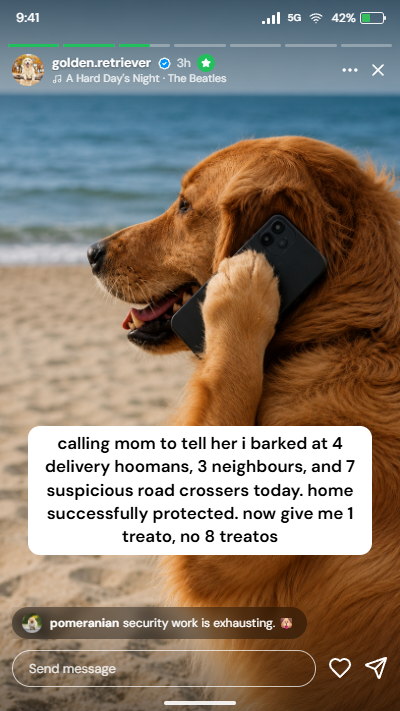
Design a realistic Instagram story from the viewer or owner side, with Close Friends, shared posts and reels, and a real screenshot look.
Drag and drop the story photo or video here
PNG, JPG, WebP or a video clip
The preview is the export, what you see here is exactly what saves.
About This Tool
This Instagram story maker builds a lifelike story preview, from either side of the screen, showing how a story looks to someone watching it, or to the account that posted it. Photos, videos, reels and shared content all fit the layout, and every detail on screen stays editable, down to the smallest badge and label. The finished design downloads as a sharp image in seconds, ready to use as a story template, a class demo, or a harmless joke. It is free, needs no account, and runs on desktops, laptops, tablets, and phones.
How To Create An Instagram Story Mockup?
A finished story design comes together in six short steps.
- 1
Pick which side of the story screen to build from.
- 2
Choose the story format and upload a photo or video.
- 3
Type the username, time stamp, music line, and any on-screen text.
- 4
Adjust the toggles and numbers until the layout looks believable.
- 5
Switch on the phone screenshot to see if the story needs one.
- 6
Press download to save the finished story image to the device.
Quick Tutorial
See how easy it is to create realistic mockup stories.
Both Sides Of The Story, Fully Editable
This story creator covers everything a real Instagram story screen shows.
Viewer And Owner Sides
Flip between the reply bar a viewer sees and the “Seen by” screen the owner sees.
Close Friends Look
One toggle turns the progress bars green and adds the green star badge.
Three Story Types
Use a gallery photo or video, a shared feed post, or a shared reel card.
Real Viewer Faces
Set the “Seen by” count and upload photos for the first three faces in the pile.
Story Comments
Show a floating comment bubble with the commenter’s photo, name, and text.
Progress Segments
Choose how many story segments sit at the top and which one is playing.
Text Sticker
Add a caption sticker in three styles, placed at the top, middle, or bottom.
True Screenshot Look
Edge-to-edge iPhone or Android screens with a real status bar, no fake bezels.
Sharp Image Export
Save the story template at 1x, 2x, or 3x, or copy it straight to the clipboard.
Instagram Story Mistakes Worth Avoiding
Small layout slips are what give an unconvincing story away.
Wrong Story Size
Anything that is not a 9:16 layout gets cropped or letterboxed by the app.
Tiny Fonts
Thin or small fonts for Instagram stories vanish against bright photos and busy backgrounds.
Covered Corners
Text placed at the very edges hides behind the profile row and the reply bar.
Too Much Text
Stories get skipped within seconds, so one short line beats a full paragraph.
Low-Quality Photos
Stretched or over-compressed images turn blurry once the story fills a phone screen.
Bad Posting Time
The best time to post an Instagram story is when followers are active, usually evenings.
Why Use This Story Maker Instead Of Manual Editing?
Faking a believable story by hand goes wrong in predictable ways.
Pixel-True Layout
Bars, badges, and fonts match the app, so nothing ever looks pasted on.
Edit Anytime
Every word and number stays changeable, instead of redoing a screenshot edit from scratch.
Free, No Sign-Up
No account, watermark, or limit on how many story designs get made.
Any Device
The full editor runs on phones, tablets, laptops, and desktops alike.
Usage Policy
This site is not responsible for story images produced by its users. By using this Instagram story generator, every user agrees to act lawfully and ethically, including, but not limited to, complying with these rules:
- Generated story images must never be used to harass, attack, threaten, slander, disparage, intimidate, or otherwise hurt any person or entity.
- Generated stories must never spread false information that could affect anyone’s life in a negative way.
- Created stories must not be passed off as real. It must stay obvious to every viewer that the screenshot is a mockup, not a genuine story.
You Might Be Wondering
1080 by 1920 pixels. Every export from this tool already matches that shape, so nothing needs resizing.
No. This is not a story viewer or downloader; it only builds mockups from scratch using uploaded media.
Text and settings are stored locally in the browser, so a draft reloads automatically. Media clears once the tab closes.
Never. Everything runs on the device, and images or videos are not sent, stored, or tracked anywhere.
For feed posts, carousels, videos, and reels, the separate Instagram Post Generator offers the same level of control.
You May Also Like

Instagram Post Generator
Create a realistic Instagram post, reel, or carousel mockup and export it as an image.

Instagram Long Comment
Copy viral, infinite-scroll vertical comments to prank friends in Instagram comments section.

Instagram DM Generator
Create realistic fake Instagram DM screenshots, free, private, no watermark.

Video Background Remover
Remove or replace any video background for free, online with no watermark.

Upside Down Text Generator
Flip text upside down or reversed for social posts, comments, and informal content.

Image Background Remover
Remove backgrounds from images online with AI assistance.
