
Base64 Encoder Decoder
Encode or decode Base64 for text, images, and files, all in-browser.
About This Tool
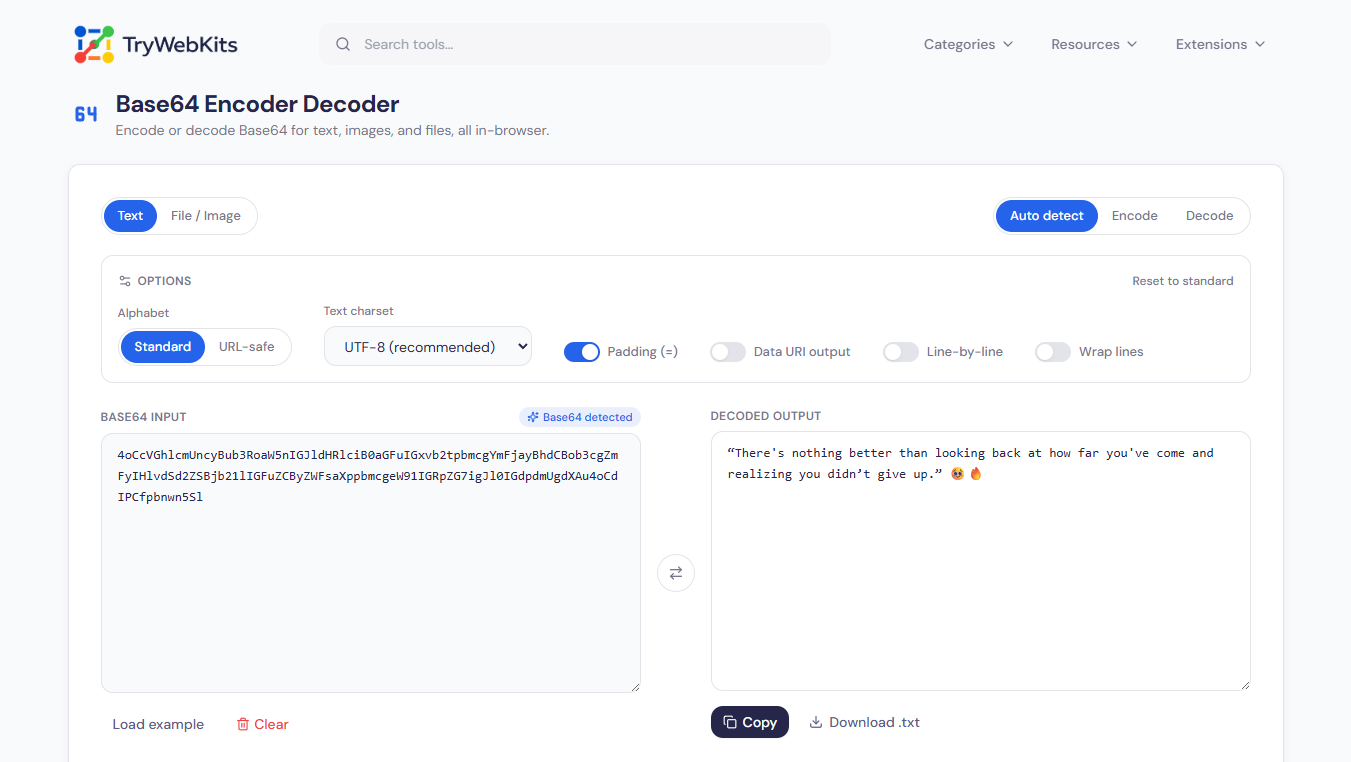
This Base64 encoder decoder works in both directions: plain text becomes Base64, and Base64 turns back into readable text or the original file. Images and other files convert into raw Base64 or a data URI, and images can also come out as a paste-ready HTML, CSS, or Markdown snippet. If decoded data is an image, a preview appears with a download button, while PDF, ZIP, and MP3 data downloads with the right extension. For finer control there is a URL-safe alphabet, optional padding, line wrapping at 64 or 76 columns, and a line-by-line mode that converts lists one entry at a time.
How To Encode Or Decode Base64 Text?
The result updates live, so no convert button is needed.
- 1
Pick Encode or Decode, or use Auto detect to let the tool decide.
- 2
Type or paste the text into the input box.
- 3
For an image or file, use the File / Image tab and drop it in.
- 4
A public link to a file works too: paste it and confirm the fetch.
- 5
Adjust the options only when a particular format is required; the defaults suit most cases.
- 6
Copy the result, download it, or press the swap button to convert it back.
How Does Base64 Encoding Work?
Base64 is a way of writing any data, whether a sentence, a photo, or a whole program, using only 64 ordinary characters: A to Z, a to z, 0 to 9, plus + and /. Computers store everything as bytes, but many systems can safely carry only plain characters. Base64 rewrites the bytes with characters those systems accept, and decoding reverses the process exactly.
Think of pouring the same water from three large glasses into four smaller ones. Nothing is added or lost; there are simply more glasses to carry, which is why the encoded output is always a little longer than the input.
Bytes Become Numbers
every three bytes (24 bits) are cut into four groups of six bits, and each group is a number from 0 to 63.
Numbers Become Characters
each number picks one character from the 64-character list, so three bytes always become four characters.
Padding Fills The Gap
when the input does not divide evenly into threes, one or two = signs are added at the end so the length stays a multiple of four.
Size Grows By A Third
four characters for every three bytes means the output is roughly 33% larger, and the size row under the tool shows this growth live.
Take the word Cat:
| Step | What Happens | Cat |
|---|---|---|
| Letters To Numbers | Each letter has a standard number code | C = 67, a = 97, t = 116 |
| Numbers To Binary | Each number is written as eight 0s and 1s | 01000011 01100001 01110100 |
| Regroup | The 24 digits are split into four groups of six | 010000 110110 000101 110100 |
| Groups To Numbers | Each group of six is read as a number from 0 to 63 | 16, 54, 5, 52 |
| Numbers To Characters | Each number is swapped for its Base64 character | Q, 2, F, 0 |
| Result | The four characters are joined | Q2F0 |
Cat has exactly three letters, so no padding is needed. Hi has only two, so the last group is not full and the output ends with an = sign: Hi becomes SGk=. Decoding simply runs the same table from bottom to top.
Every Base64 Job In One Place
The options cover everything the format is used for in practice.
Live Auto Detect
The input is read as it is typed, and the tool picks encode or decode by itself.
Image Previews
Decoded images render as a live preview, and uploaded images show a thumbnail before converting.
Paste-Ready Snippets
Images convert straight into a data URI, an img tag, a CSS rule, or a Markdown line.
Full Unicode Support
UTF-8 handles emoji and every script correctly, with UTF-16 LE and Latin-1 for legacy data.
Line-By-Line Mode
Each line converts on its own, with invalid lines reported by their exact line number.
Real Format Control
URL-safe alphabet, optional = padding, and MIME wrapping at 64 or 76 columns.
Frequently Asked Questions
No. It only changes how data is written, not who can read it. Anyone can decode it, so it never replaces a password or proper encryption.
The original was encoded with a different character set. Switch the charset option between UTF-8, UTF-16 LE, and Latin-1 until the text reads correctly.
No fixed cap. Everything is processed in chunks, so the only limit is the memory of the phone or computer running the browser.
Spaces, line breaks, and a data: URL prefix are stripped, missing = signs are restored, and both alphabets are accepted. Real errors point to the exact character position.
It was encoded more than once. A decode again button appears whenever the output still looks like Base64, so each layer can be peeled off in turn.
Putting images straight into web pages, stylesheets, and emails, carrying binary data inside JSON or URLs, storing keys and tokens, and sending attachments through text-only systems.
You May Also Like

Online UUID Generator
Create unique GUID & UUIDs for apps and databases.

QR Code Generator
Create QR codes for URLs, text, WiFi, and more

URL Unshortener
Instantly expand the shortened links before clicking them to protect yourself from malware and phishing.

Regex Tester & Generator
Test, generate, and debug regular expressions with real-time matching.

NTLM Hash Generator
NTLM password hash generator for pentesting and research.

Online IDE
Run JavaScript, TypeScript, Python, Lua, SQL and HTML directly inside browser.
