
URL Unshortener
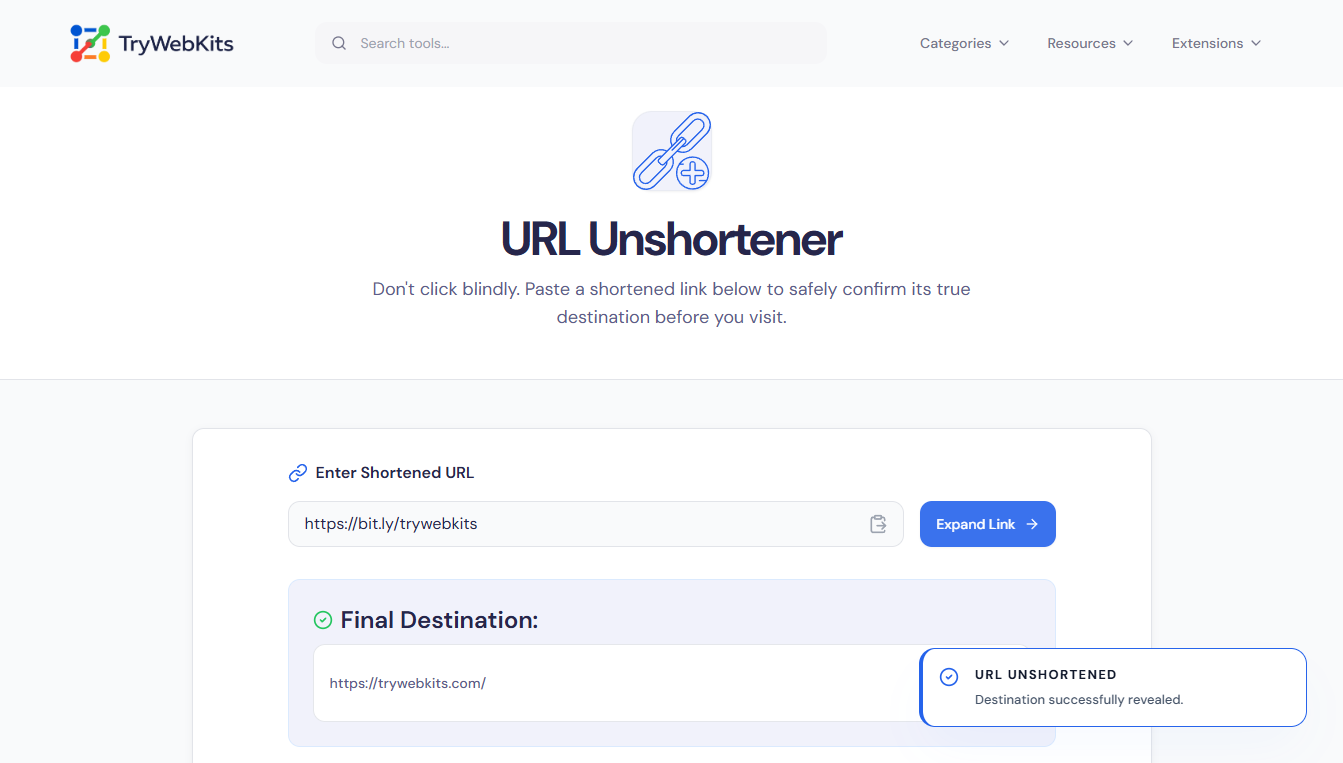
Don't click blindly. Paste a shortened link below to safely confirm its true destination before you visit.
What is a URL Expander Tool?
This URL Unshortener tool is designed to instantly reveal the original, long destination of any shortened link. A short URL, like those created by Bitly or TinyURL, hides its final destination, which can pose a security risk or lead to unexpected content. The url expander service fetches the actual, underlying URL without visiting the link, providing transparency and safety before clicking.
Its primary use is to check short urls and ensure the linked content is legitimate and safe, helping users make informed decisions before proceeding. Use it to quickly unshorten urls and verify any hidden destination.
How To Unshorten A Link?
Unshortening a link is a quick, straightforward process:
- 1
Paste Short URL: Copy the shortened link into the input box on the page.
- 2
Start Expansion: Click or tap the 'Expand Link' button.
- 3
View Destination: The tool instantly displays the final, expanded URL.
- 4
Check Safety: Review the destination URL to confirm its legitimacy and safety.
- 5
Copy Final Link: Easily copy the long, final destination URL for use.
Key Features Of Our URL Expander Service
Safely check short links with these key features:
Instant Results
Get the final destination URL in milliseconds.
Safety Verification
Check Short Link status to identify potential malware or phishing sites before visiting.
Multi-Service Support
Link Shortener Expander works with Bitly, TinyURL, t.co, and hundreds of other providers.
Cross-Platform Use
Accessible on mobile, tablet, and desktop devices.
Privacy Focused
Unshorten It without leaving a footprint or being tracked by the original shortener.
Simple Interface
Intuitive design makes it easy to link unshorten.
What Links Can Be Unshortened?
This tool works effectively with most common short link providers. Practical scenarios include:
Social Media Links
When a link from Twitter or Facebook is shortened (t.co), the tool reveals the actual article or product page.
Email Links
Verifying links in suspicious emails that use check tiny url services to hide their true, potentially malicious, origin.
QR Code Destinations
Checking the destination of a URL embedded in a QR code before scanning and visiting the site.
Affiliate & Marketing
Marketers often use a bitly link checker to mask long affiliate strings. This tool reveals the underlying tracking parameters and final store page.
Why Use This URL Unshortener?
Verify any hidden link destination instantly to maintain complete online safety:
No Software Required
Link expander online works instantly in any web browser without needing to install risky extensions.
Malware Protection
Verify short url safety by seeing the domain before the browser actually loads any harmful scripts.
Reliable Results
Best url expander logic handles multiple redirects, ensuring the very last page in the chain is found.
Frequently Asked Questions
Yes, the tool functions as a reliable bitly url expander and works with virtually all popular shortener services.
No. If the original shortening service has deleted the link or if it has expired, the unshorten me process will return an error or a broken link status.
The tool can unshorten most major shortener services, but extremely new or highly proprietary short links might occasionally not resolve.
It is much safer. The tool checks the destination without the user visiting the potentially harmful website themselves.
Yes, it acts as a reliable tiny url expander and can instantly reveal the final destination of TinyURL links.
You May Also Like
Strong Password Generator
Generate secure, randomized, and cryptographically strong passwords locally in browser.

Email Header Analyzer
Analyze raw email headers to trace delivery routes, verify SPF/DKIM/DMARC, & diagnose delivery delays.

Find My IP & Device Info
Check your public IP address, estimated location, ISP, and detailed browser/device user agent information securely.

NTLM Hash Generator
NTLM password hash generator for pentesting and research.

QR Code Generator
Create QR codes for URLs, text, WiFi, and more

URL List Cleaner
Clean, sort, deduplicate, and organize URL lists online.
