
Email Header Analyzer
Trace the path an email took to reach you. Verify SPF, DKIM, and DMARC
to identify spoofing and phishing attempts instantly.
About This Tool
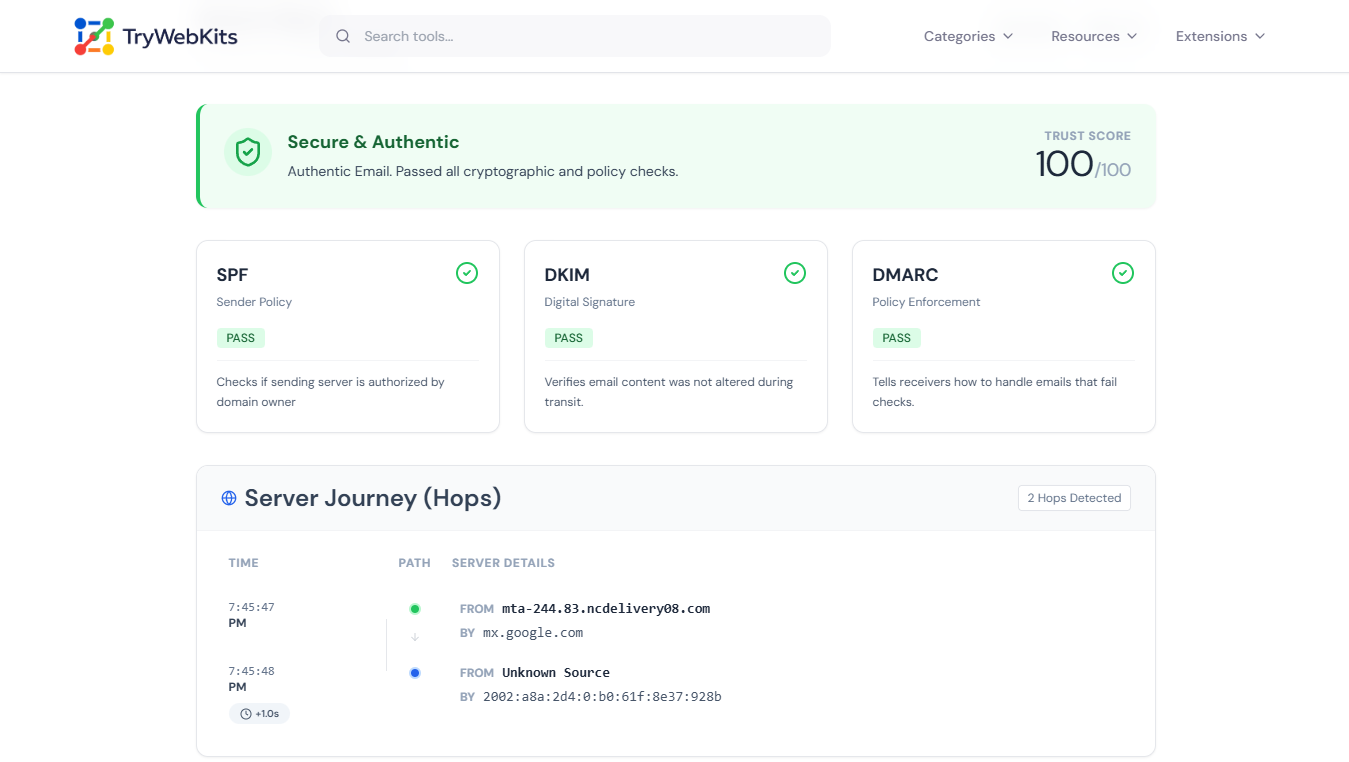
This tool serves as a comprehensive email header analyzer designed to reveal the hidden data within digital correspondence. Every email carries metadata detailing its journey from sender to recipient. By using our header analysis tool, users can decode message paths, identify originating IP addresses, and verify security protocols like SPF, DKIM, and DMARC.
It functions as a spam header analyzer to detect spoofing attempts and validate the authenticity of incoming mail. Whether troubleshooting delivery delays or performing a security audit, this email header parser translates complex technical data into a readable format for quick assessment.
How Does This Email Header Analyzer Work?
Here is how the tool works:
- 1
Locate the raw email header data within the specific email client application.
- 2
Copy the entire text block containing the message headers to the system clipboard.
- 3
Paste the copied text into the designated email header analyzer input field and click the 'Analyze Headers' button.
- 4
Review results, including IP location, authentication status, and specific delivery delays.
- 5
Download the complete analysis as a PDF or JSON file for record-keeping or sharing with IT teams.
How do I Get Email Headers?
Different email clients require specific steps to access the raw header data needed for forensic analysis.
Gmail (Web)
Open the target message, click the three vertical dots next to the reply button, and select "Show original" to view the full header.
Microsoft Outlook
Open the email in a separate window, navigate to File > Properties, and look for the "Internet headers" text box at the bottom.
Apple Mail
Open the message, click on the "View" menu in the top bar, select "Message", and choose "Raw Source."
Yahoo Mail
Open the email, click the "More" icon (three horizontal dots), and select "View Raw Message."
Key Features
Visualize the complete route & servers the message traversed to reach inbox.
Spot Phishing
Verify if the sender is truly who they claim to be using DKIM & SPF checks
Trace Delays
Pinpoint exactly which server caused delivery latency in the hop chain
Security Audit
Ensure your own emails are compliant with Google & Yahoo sender guidelines
Origin IP Tracing
Extracts the sender's IP address to determine the geographical location of the email source
Spam Score Analysis
Highlights common red flags used by spammers and phishers
Export Reports
Download analysis results as PDF or JSON files for documentation and sharing
Privacy & Security
All data processing occurs locally on your device. No email headers, content, or metadata are ever transmitted to external servers. The analysis runs entirely within your browser's secure environment. Once the page is closed or refreshed, all information is instantly wiped. Your data never leaves your device.
Common Queries
Yes. Forensic analysis identifies discrepancies between the From address and the Return-Path (envelope sender). It also flags failed authentication checks, which are primary indicators of illegitimate spoofing attempts.
Header analysis maps the timestamp of every server hop. This allows administrators to pinpoint exact bottlenecks or misconfigured MTAs within the delivery chain that are causing transmission delays.
The originating IP address appears in the Received fields, typically in the first or last entry. An email header analyzer ip address lookup shows the exact location.
SPF verifies sending server authorization. DKIM confirms content integrity. DMARC ties both together. An email header analyzer spf check shows pass or fail for each.
Failed SPF means the sending server was not authorized by the domain owner. This often appears in spam and spoofed emails.
You May Also Like

URL Unshortener
Instantly expand the shortened links before clicking them to protect yourself from malware and phishing.

Strong Password Generator
Generate secure, randomized, and cryptographically strong passwords locally in browser.

QR Code Generator
Create QR codes for URLs, text, WiFi, and more

Regex Tester & Generator
Test, generate, and debug regular expressions with real-time matching.

NTLM Hash Generator
NTLM password hash generator for pentesting and research.
