Domain to IP Converter
Convert any domain into its IP addresses, then dig into every DNS record and full details for each IP.
- Free to use, no sign-up needed.
- IPv4, IPv6, and eight DNS record types.
- Formatted answers plus the raw JSON.

About This Tool
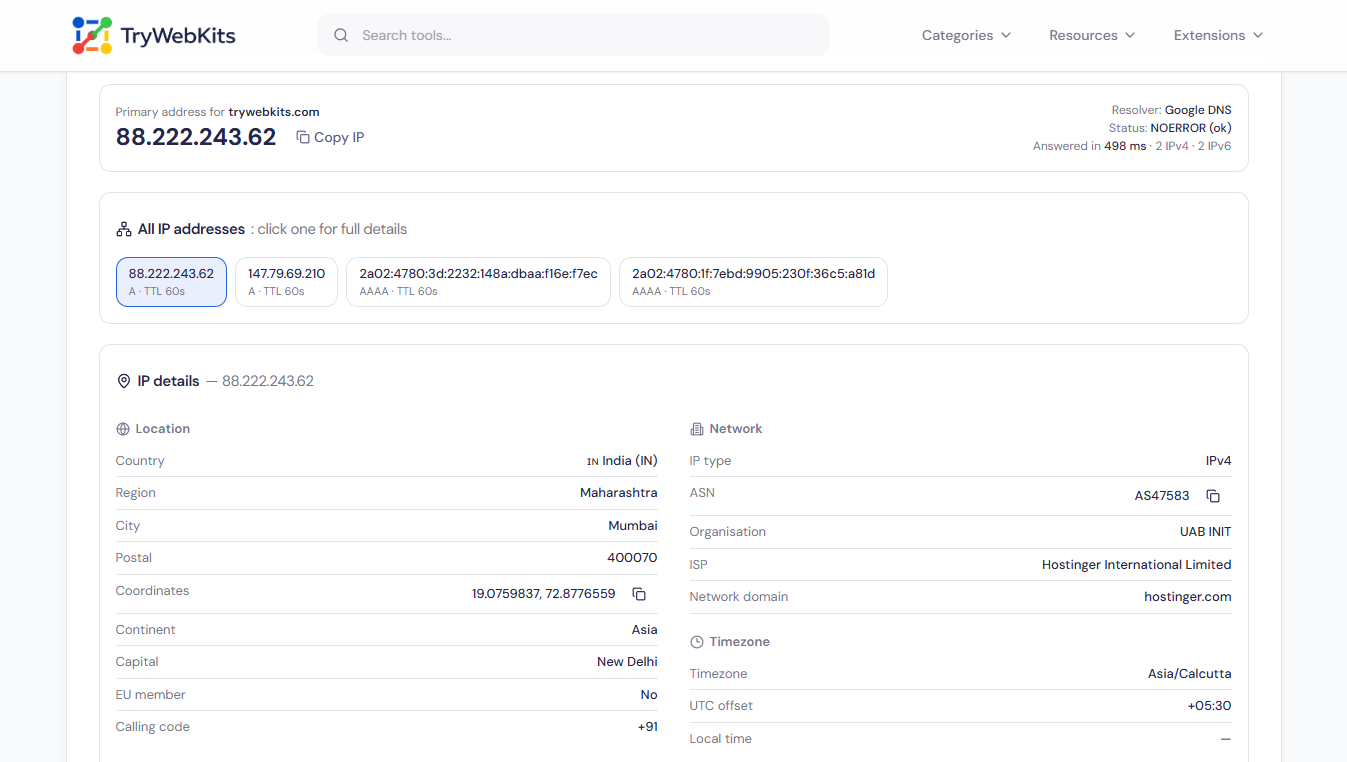
This domain to IP converter turns any domain name into the addresses behind it, straight in the browser. One search lists every IPv4 and IPv6 address a site resolves to, opens the rest of its DNS records in a click, and pulls up complete details for each address. Answers come back within seconds and can be copied or saved for reports and scripts.
It is free, needs no account or install, and the whole lookup runs the same on desktops, laptops, tablets, and phones.
How To Look Up A Website's IP Address?
Finding a site's IP address here takes about a seconds:
- 1
Type a domain name, or paste a full website link, into the box.
- 2
Press the lookup button and wait a second or two.
- 3
Read the list of addresses the domain currently points to.
- 4
Tap any address to see its complete details.
- 5
Open the record tabs for anything beyond plain addresses.
- 6
Copy any value, or download the whole answer as a text file.
How Does This Domain IP Lookup Work?
Every website lives on servers that are reached by number, not by name. When a domain goes into the box, the browser quietly asks a trusted public phonebook, the same kind every browser uses to load pages, which numbers that name currently points to. The reply travels over a secure connection and lands in under a second. A separate service is then asked about each number, filling in the rest of the picture. Nothing gets installed, no command line opens, and no middle server sits in the way; the browser talks to the sources directly, which is what keeps this site IP lookup fast and private.
Core Capabilities Of This Domain To IP Lookup
One search gathers far more than a single address.
IPv4 And IPv6
Every A and AAAA record the domain resolves to is listed, not just the first hit.
Eight Record Types
CNAME, MX, NS, TXT, SOA, and CAA entries open in one click each.
Two Resolvers
Ask Google or Cloudflare and compare how each one answers the same domain.
Owner Details
The ASN, organisation, and ISP behind each address show who actually runs it.
Location And Timezone
Country, region, city, coordinates, and the server’s local time at a glance.
Raw JSON View
Every answer expands exactly as the API returns it, ready for scripts and reports.
How DNS Resolution Works?
Behind every lookup sits a short chain of questions and answers.
Root Servers First
The resolver starts at the root, which points it toward the right domain ending.
TLD Directories
The .com or country-level directory names the servers responsible for that exact domain.
Authoritative Answer
The domain’s own name server replies with the final, official list of addresses.
Caching And TTL
Answers are remembered for the seconds shown as TTL, so repeated lookups stay instant.
Data Security
Lookups go directly from the browser to the public resolver (Google or Cloudflare) and to the ipwho.is service, nothing passes through or is stored on TryWebKits servers. Only the recent-lookup list is kept locally in the browser so past domains are one tap away, and it clears the moment browser data is cleared.
Guide & FAQs
Yes. Paste any link and the tool strips https://, paths, and ports automatically before running the lookup.
Yes. Our other tool, bulk domain to ip converter resolves up to 50 domains together with the same network details.
Larger sites spread traffic across multiple servers, and each server gets its own entry in the answer.
Not here. That reverse direction relies on a different record type and needs its own dedicated lookup.
A recent-domain list stays in the browser only, and it disappears whenever browsing data is cleared.
You May Also Like

Bulk Domain to IP Converter
Resolve up to 50 domains to IP addresses, view country, ASN, and ISP details, then export results as CSV.

Find My IP & Device Info
Check your public IP address, estimated location, ISP, and detailed browser/device user agent information securely.

URL List Cleaner
Clean, sort, deduplicate, and organize URL lists online.
CSV Viewer Online
View, search, edit and analyze CSV files and spreadsheets directly in browser.

URL Unshortener
Instantly expand the shortened links before clicking them to protect yourself from malware and phishing.

QR Code Generator
Create QR codes for URLs, text, WiFi, and more
