Find My IP Address, Location & User Agent
Dashboard to check your public IP address, estimated network location, and visible device footprint.
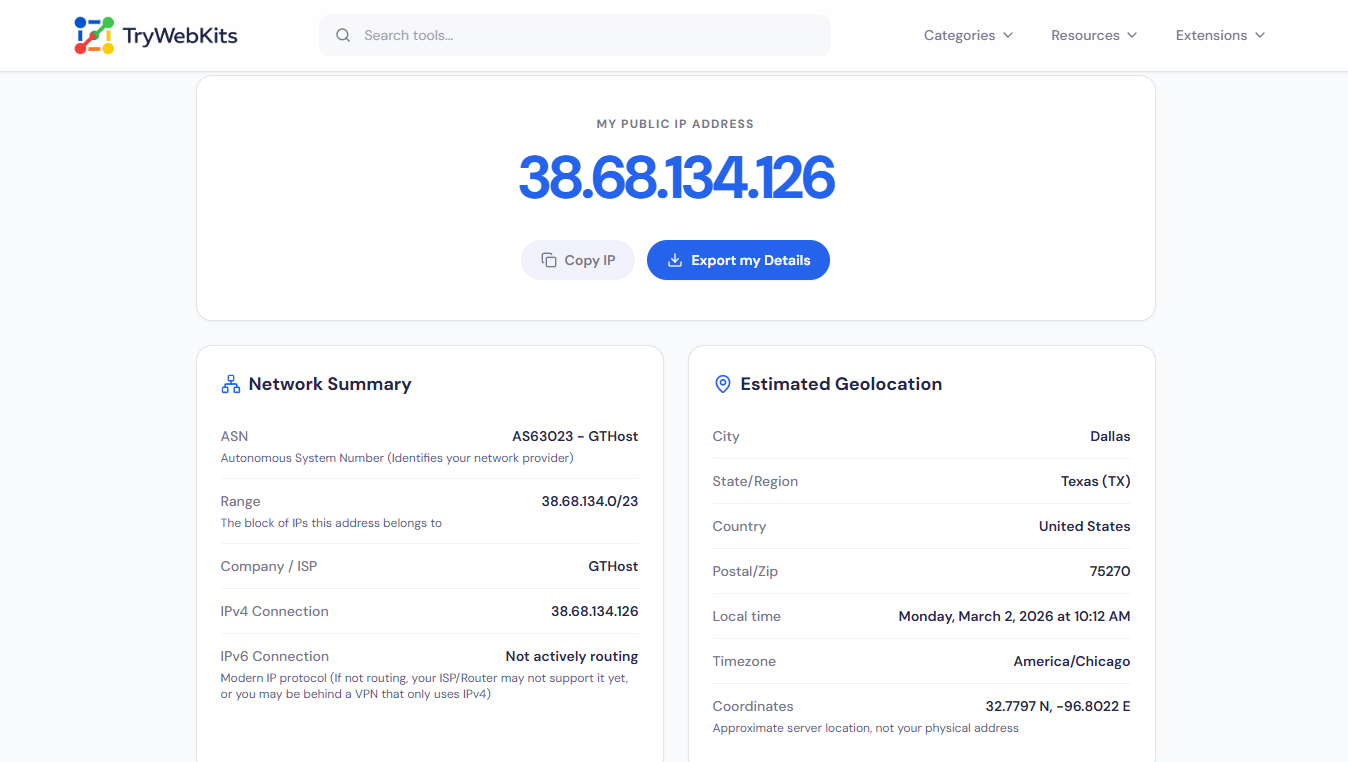
My Public IP Address
Network Summary
Estimated Geolocation
Browser & Device Footprint
This is the data your browser openly shares with websites you visit.
Mozilla/5.0 (Windows NT 10.0; Win64; x64) AppleWebKit/537.36 (KHTML, like Gecko) HeadlessChrome/148.0.0.0 Safari/537.36
Privacy & Security
Can websites tell if you are hiding your IP?
The Truth About VPN Detection
Basic web tools cannot natively detect premium VPNs, Proxies, or Tor networks accurately without paying for enterprise-grade threat intelligence databases.
If your ASN above says "Mullvad", "Cloudflare", or "NordVPN", websites generally assume you are routing your traffic privately.
Local processing active. Your data is not being logged by TryWebKits.
About This Tool
The Find My Public IP Address tool instantly identifies the current internet protocol address ( ipv4 and ipv6 ) assigned to a given device. Simply opening the webpage triggers an automatic check to display the exact network connection details. For anyone searching for queries like "what is my ip address" or "check my public ip", this dashboard reveals the exact numerical label identifying the internet connection to the outside world.
Beyond basic addressing, our tool provides a comprehensive look at the estimated geolocation, autonomous system number (ASN), and the specific browser footprint left behind when visiting websites. This tool offers a transparent view of the network data visible to the public internet, requiring absolutely no technical expertise to understand. Whether trying to find public IP address details for server configuration or simply curious about online footprints, the dashboard delivers instant, accurate metrics.
How to Find My IP Address?
Follow these simple steps to retrieve your network details.
- 1
Your public Internet Protocol (IP) address is prominently displayed at the top of this dashboard.
- 2
Please refer to the large numerical sequence positioned at the uppermost section of the current webpage; this constitutes your IP address.
- 3
Scroll down to examine the estimated network location and device browser footprint metrics.
- 4
Click the copy button to instantly save the exact IP details to the clipboard.
- 5
Hit the export button to download a comprehensive text file containing all network diagnostic information.
Key Features
Everything you need to analyze your public network connection.
Instant Network Detection
Automatically identifies and displays the active public internet protocol address immediately upon page load.
Comprehensive Network Summary
Displays the specific internet service provider, autonomous system number, and the assigned network block.
Estimated Geolocation Tracking
Shows the approximate geographic location, region, and country of the server routing the traffic.
Device Footprint Analysis
Identifies and displays the operating system, browser type, and the exact raw user agent.
Secure Clipboard Copying
Provides a simple, one-click button to instantly copy the exact network address for sharing.
Export Diagnostic Reports
Allows downloading a structured text file containing all detected network, location, and device metrics.
IPv4 vs. IPv6 Addresses
When checking network details, the result typically shows either an IPv4 or an IPv6 format.
IPv4: The Established Standard
IPv4, or Internet Protocol version 4, represents the older, widely adopted communication standard for the internet. It is instantly recognizable by its structure: four sets of decimal numbers, each ranging from 0 to 255, separated by periods (e.g., 192.168.1.1). This design allows for approximately 4.3 billion unique addresses.
While this number seemed massive in the early days of the internet, the explosive proliferation of connected devices, including computers, smartphones, tablets, and the myriad sensors and gadgets of the Internet of Things (IoT), led to the complete exhaustion of the globally available public IPv4 address supply. This critical limitation necessitated the development of a long-term replacement protocol.
IPv6: The Modern Solution
In response to the global exhaustion of IPv4 addresses, network engineers developed and deployed IPv6 (Internet Protocol version 6). This modern version utilizes a far more complex and expansive addressing scheme. An IPv6 address is characterized by a significantly longer sequence of alphanumeric characters, typically presented in eight groups of four hexadecimal digits, separated by colons (e.g., 2001:0db8:85a3:0000:0000:8a2e:0370:7334).
This structure provides an almost incomprehensible, effectively limitless supply of unique network identifiers (approximately $3.4 \times 10^38$), ensuring that every single smart device, regardless of future population growth or technological expansion, can have its own distinct public address.
Transition and Compatibility
Despite the clear benefits and necessity of IPv6, its full adoption is an ongoing process. Not all internet service providers (ISPs) around the world have fully upgraded their core infrastructure to natively support IPv6 routing. Similarly, many older or even some current local home and business routers may not be configured for, or even capable of, fully utilizing IPv6.
This creates a need for backward compatibility. If a device attempts to connect using IPv6 but the local network or the ISP's backbone is not actively routing IPv6 traffic, the device will automatically and seamlessly default to using the standard IPv4 format. This automatic fallback mechanism is essential for maintaining a stable, uninterrupted, and functional internet connection for the user, regardless of the network's current level of modernization.
Public vs. Private IP Addresses
Understanding the difference between public and private IP addresses helps in network troubleshooting and security configuration.
| Feature | Public IP Address | Private IP Address |
|---|---|---|
| Primary Function | Connects an entire local network to the global internet. | Connects individual smart devices within a single home network. |
| Online Visibility | Visible to external websites, servers, and the outside internet. | Hidden from the public internet, visible only to the local wireless router. |
| Assigned By | Provided directly by the internet service provider (ISP). | Assigned automatically by the local home router. |
| Simple Analogy | Acts like the main physical street address of a residential house. | Acts like specific internal room numbers inside that exact house. |
| Device Usage | One shared network connection represents the whole household online. | Every connected smartphone, laptop, or printer gets a unique local number. |
Why Your Public IP Address is Dynamic and Changes Frequently?
Most standard residential internet connections and cellular data plans utilize dynamic allocation. Internet service providers assign temporary addresses from a massive shared pool of available numbers. Restarting a modem, experiencing a brief power outage, switching from a local Wi-Fi network to cellular data, or connecting to a virtual private network alters the visible numerical identifier completely.
This constant rotation helps service providers manage limited network resources efficiently across millions of customers. Conversely, static addresses remain permanently fixed and never change. Obtaining a static public configuration usually requires signing a specialized business contract with the local internet provider, often at an additional monthly cost.
Privacy & Security
This internet utility processes all network detection requests locally right inside the active browser window. The dashboard strictly displays the standard diagnostic information already visible to every single website visited on the internet. Absolutely no personal data, network metrics, location coordinates, or search histories are logged, stored, or sold to third-party tracking databases.
Questions & Answers
An autonomous system number (ASN) officially identifies a large network operator, like an internet service provider, helping route global internet traffic efficiently and accurately across different geographical regions.
No. Public network addresses only display the approximate geographic location of the nearest data center owned by the internet provider, never a precise residential physical home location.
IP geolocation typically identifies only the general area, often at city level, rarely specific addresses.
Public network labels are visible by design. If targeted by malicious web traffic, simply unplugging the home router for several minutes usually forces the provider to assign a brand new dynamic address.
Strict privacy browser extensions intentionally hide the real device footprint, manipulating the user agent string to prevent data companies from successfully fingerprinting and tracking daily online activity.