 JSON Formatter & Validator
Paste any JSON string for instant formatting, validation, and conversion.
About This Utility Tool
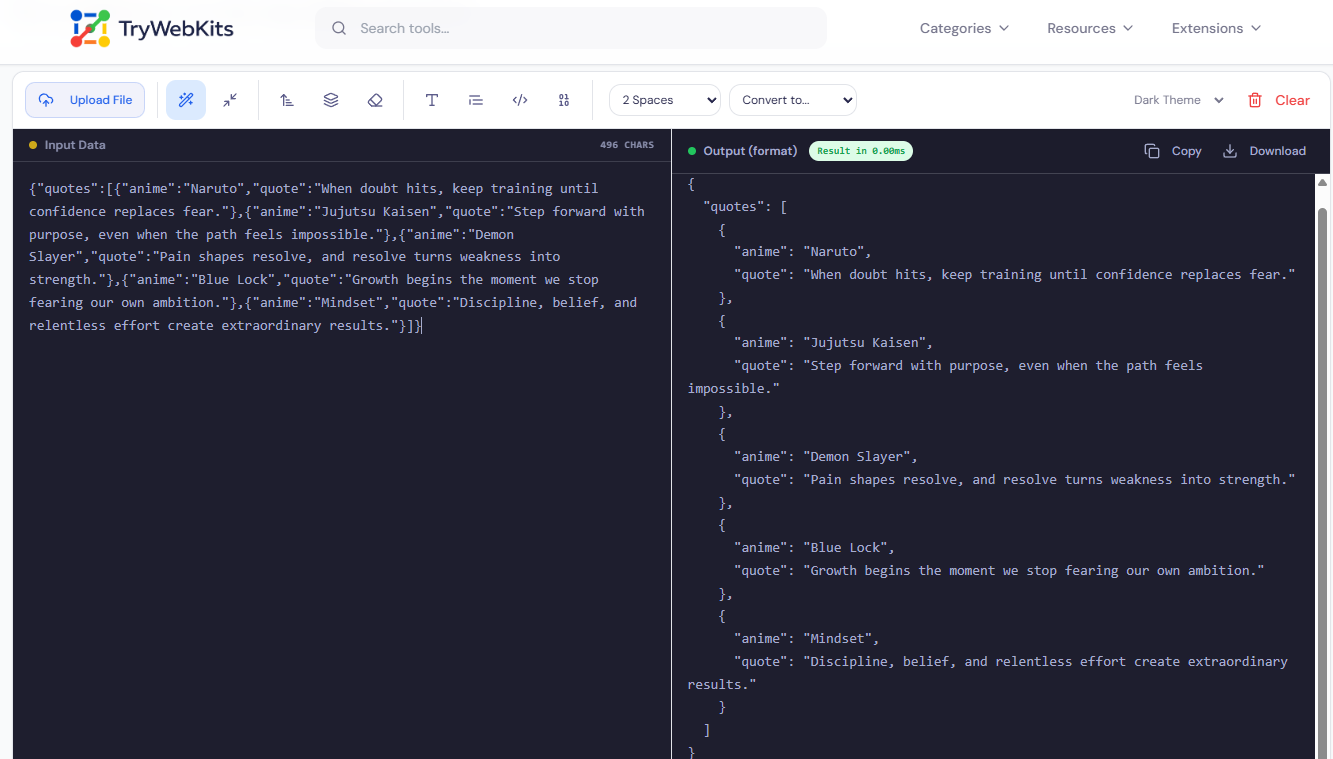
This is a free online JSON formatter and validator that runs entirely inside the browser. Paste or upload any JSON string, it formats, validates, minifies, sorts, flattens, and converts data in real time. No server is involved, no account is required, and nothing is stored. The tool detects JSON syntax errors automatically and displays exact error messages. It also handles key case conversion, null removal, Base64 encoding, and direct export. Whether reviewing an API response or cleaning a large JSON file, every operation happens locally.
What Is JSON?
JSON (JavaScript Object Notation) is the standard format for transmitting data across the web, making a reliable json validator online essential for developers, students, and system administrators. The seamless integration of formatting and validation within a single interface ensures that data is not only syntactically correct but also perfectly organized for human review. This combined online json formatter & validator simplifies complex tasks, removing the frustration associated with manual debugging. The tool’s responsiveness means it works instantly, regardless of the size or complexity of the data structure provided.
How to Format and Validate JSON With This Tool?
The streamlined steps ensure quick results and immediate utility.
- 1
Copy the raw JSON snippet from a file or source and paste it into the input area.
- 2
The output panel updates on its own, no button press or refresh needed.
- 3
To use a file, click 'Upload File' and select any .json or .txt file.
- 4
Pick an indentation size, 2, 3, or 4 spaces, from the dropdown menu.
- 5
Use the toolbar to switch between modes: minify, sort, flatten, remove nulls, or convert.
- 6
Click 'Copy' to grab the result, or 'Download' to save the output file.
Core Capabilities Of Our JSON Formatter
The following capabilities make this the preferred choice when seeking the best json formatter and json validator online.
Instant Validation
Checks syntax immediately, ensuring data structure is completely correct.
Beautify Output
Converts compressed or unreadable text into clean, organized, human-readable code.
Minify Data
Removes all unnecessary whitespace and line breaks to produce smaller file sizes.
Error Location
Pinpoints exact line and column numbers of any syntax issue or flaw.
File Import & Export
Upload .json or .txt files directly and download the processed result as a file.
Base64 Support
Encode or decode Base64 payloads without switching to a different tab or tool.
Why Choose This JSON Formatter & Validator?
Our tool provides a straightforward and powerful way to handle JSON data quickly, contrasting sharply with time-consuming manual methods.
No Manual Refresh
The output updates automatically as input is typed, no run button or page reload.
Universal Access
The tool is fully responsive and performs seamlessly on desktop, laptop, or mobile devices.
One Tool, Many Jobs
Replacing multiple separate tools for linting, converting, and transforming JSON saves significant tab-switching time.
Speed Readout
A live millisecond counter tracks exactly how long the browser took to process and return results.
Frequently Asked Questions (FAQs)
Yes, it performs a thorough syntax validation, checking for structural integrity and conforming to the official JSON standard.
The tool is optimized for efficiency and can handle very large JSON inputs without slowing down performance.
No, formatting only changes indentation and spacing; the actual key-value data remains exactly as originally entered.
All submitted data is processed client-side in the browser and is never stored on the server.
The validator will flag comments as a syntax error, as the official JSON specification does not support them.
Formatting adds spacing for readability; minifying removes spacing to reduce data size for transmission.
You May Also Like

HTML Code Formatter
Format, beautify, and organize HTML code online with proper indentation and improved readability.

XML Formatter & Validator
Format, validate, beautify, and minify XML data online with syntax checking and structured output.

HTML Code Minifier
Compress, obfuscate, and minify your HTML code. Reduces file size by removing whitespace, comments, and unneeded characters.

Text Compare Online
Compare texts or files with our side-by-side diff checker.

Text Case Converter
Convert text between uppercase, lowercase, title case, and more

Regex Tester & Generator
Test, generate, and debug regular expressions with real-time matching.
