Security Header Generator
 Security Header Generator
Build a complete HTTP security header set and copy ready-to-use config for any server.
A sensible default for most production sites: safe by default, with the small relaxations most frameworks need.
Adds a report-uri directive. The modern Reporting API also needs a matching Reporting-Endpoints header set on the server.
Default Source default-src
Fallback source list used when a specific directive below is left empty.
Script Source script-src
Where JavaScript is allowed to load and execute from.
Style Source style-src
Where CSS is allowed to load from.
Image Source img-src
Where images are allowed to load from.
Font Source font-src
Where web fonts are allowed to load from.
Connect Source connect-src
Allowed targets for fetch, XHR, WebSocket, and EventSource.
Frame Source frame-src
Allowed origins for embedded iframes.
Frame Ancestors frame-ancestors
Which sites are allowed to embed this page in a frame. Replaces the deprecated X-Frame-Options ALLOW-FROM value.
Object Source object-src
Allowed sources for object, embed, and applet elements.
Base URI base-uri
Allowed values for a document base tag, restricting base-URL injection.
Form Action form-action
Allowed targets for HTML form submissions.
About This Tool
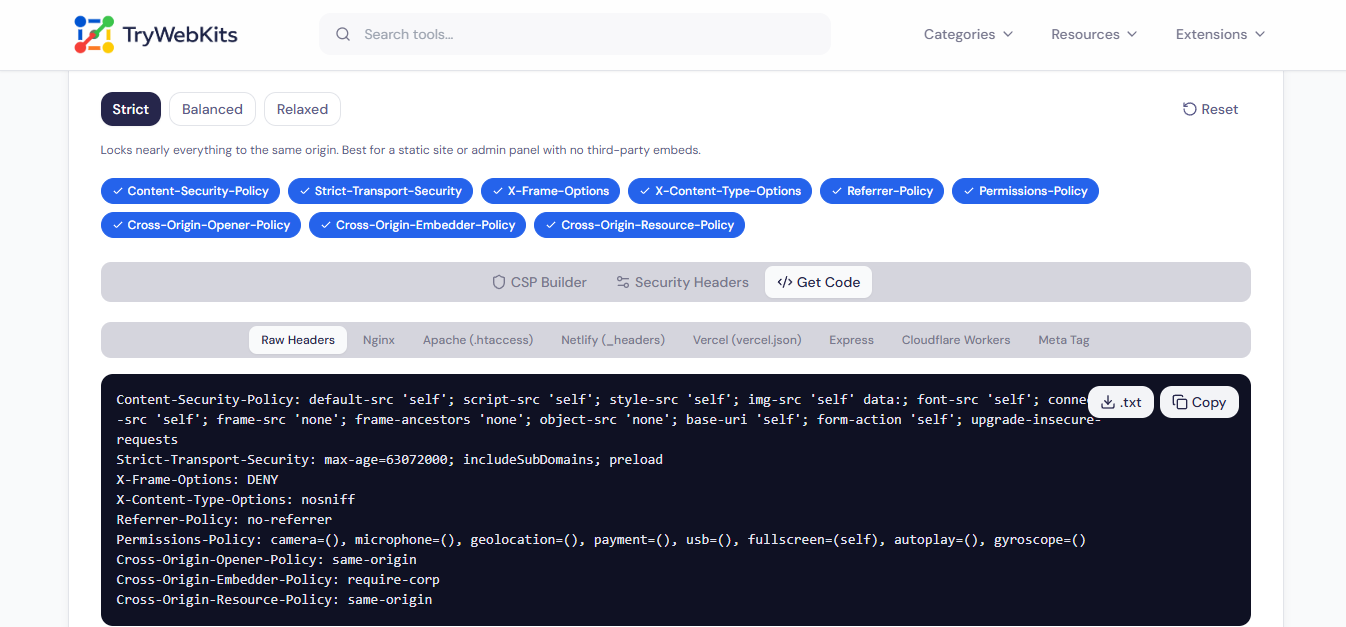
Security Header Generator builds a complete, production-ready set of HTTP security headers directly in the browser. A starting profile sets sensible defaults, then every Content-Security-Policy directive, every permission, and every cross-origin header can be adjusted field by field. The output updates instantly and copies straight into Nginx, Apache, Netlify, Vercel, Express, or Cloudflare Workers configuration. Nothing typed here is uploaded anywhere: every value is computed locally, and it only leaves the page when it gets copied.
How To Generate Security Headers?
Four steps from a blank page to production-ready headers.
- 1
Pick a starting profile: Strict, Balanced, or Relaxed.
- 2
Adjust Content-Security-Policy sources directive by directive.
- 3
Set HSTS, Referrer-Policy, Permissions-Policy, and the cross-origin headers.
- 4
Open Get Code and copy the config that matches the target server.
Core Capabilities Of This Security Header Generator
Every Directive Editable
Each Content-Security-Policy directive gets its own source list instead of one shared default value.
Eight Output Formats
Copy matching syntax for Nginx, Apache, Netlify, Vercel, Express, Cloudflare Workers, and more.
Three Starting Profiles
Start from Strict, Balanced, or Relaxed, then adjust any single field without losing the rest.
Nothing Leaves The Browser
Every header value is generated locally, and nothing typed into this page is sent anywhere.
Live Header Summary
A running summary shows exactly which of the nine core headers are switched on at a glance.
Copy Or Download Anywhere
Copy every output block with one tap or download it as a plain text file.
Security Best Practices
Avoid Wildcard Sources
A bare asterisk in any Content-Security-Policy directive defeats most of its protection, so list trusted domains explicitly instead.
Pair X-Frame-Options With CSP
Set both, since some older browsers only respect X-Frame-Options while modern ones read the frame-ancestors directive.
Set A Real HSTS Max-Age
A max-age under six months gives browsers little lasting protection; most production sites use a year or longer.
Keep Permissions-Policy Current
Revisit which browser features are allowed whenever a new third-party script or embed gets added to the site.
Don't Skip X-Content-Type-Options
This single header line blocks a whole class of MIME-sniffing attacks and rarely breaks anything on a site.
Match COOP With COEP
Cross-Origin-Embedder-Policy usually needs a matching Cross-Origin-Opener-Policy value to actually achieve cross-origin isolation.
Why Use Our Tool
Built For Beginners And Experts
Presets give a fast start, while every single field stays open for hands-on adjustment.
Easy To Understand, Detailed To Use
Each directive and header carries its own plain-language hint, not just a bare input field.
No Sign-Up, No Limits
Every header and output format is available immediately, with nothing gated behind an account.
Nothing To Install
Runs entirely as a web page, with no browser extension, account, or software download required.
Common Security Header Questions
A response header that tells the browser how to treat a page: which scripts to trust, whether it can be framed, and how much referrer data to share, among other things.
Content-Security-Policy, Strict-Transport-Security, X-Content-Type-Options, and Referrer-Policy cover the most common risks and fit almost any site.
Not required, but it is the single most effective header against cross-site scripting. A minimal self-only policy is far better than none at all.
It can, if scripts, styles, or embeds load from other domains. Test on a staging environment first, or send the policy as Content-Security-Policy-Report-Only before enforcing it.
Cross-Origin-Embedder-Policy set to require-corp blocks cross-origin resources that do not send a matching Cross-Origin-Resource-Policy header, so some embeds may need unsafe-none instead.
A directive most likely does not list that domain, or the resource loads inline without an unsafe-inline allowance. Check the browser console for the exact blocked source, then add it to the matching directive.
Yes, though a CDN sitting in front of the origin needs to pass these headers through unchanged rather than stripping or rewriting them, since some CDNs alter headers by default.
Strict locks sources down to self with little else allowed, Relaxed permits broader third-party sources like widgets and ad scripts, and Balanced sits in between as a starting point for most sites.
Open the Get Code tab, pick the matching platform, and paste the generated snippet into the relevant config: nginx.conf, .htaccess, a Netlify _headers file, or the equivalent for Vercel, Express, and Cloudflare Workers.
You May Also Like

Regex Tester & Generator
Test, generate, and debug regular expressions with real-time matching.

Email Header Analyzer
Analyze raw email headers to trace delivery routes, verify SPF/DKIM/DMARC, & diagnose delivery delays.

URL Unshortener
Instantly expand the shortened links before clicking them to protect yourself from malware and phishing.

JSON Formatter & Validator
Format, validate, beautify, and analyze JSON data online with readable structure and syntax checking.

Online UUID Generator
Create unique GUID & UUIDs for apps and databases.

Domain to IP Converter
Resolve any domain to IPv4 and IPv6 addresses, view DNS records, and explore per-IP network details.
