
Facebook Post Generator
Design realistic Facebook posts with reactions, comments, and photo grids, then download them as images.
The preview is the export, what you see here is exactly what saves.
About This Tool
This Facebook post generator builds a lifelike copy of a feed post inside the browser and saves it as an image. Every part is editable: the profile name and photo, the post text, uploaded pictures or video frames, reaction counts, comment bubbles, and the small details like the privacy icon beside the timestamp. The preview redraws while typing, so the finished file matches what appears on screen.
It runs on phones, tablets, laptops, and desktops without an account or a design app. Common uses include mockups for pitches, content planning, teaching material, screenshots for tutorials, and harmless jokes between friends.
How To Create A Fake Facebook Post Screenshot?
Making a fake Facebook post screenshot here takes about two minutes.
- 1
Set The Profile: Enter a name, add a photo, and choose the verified badge or privacy icon.
- 2
Write The Status: Type the post text and adjust the timestamp shown under the name.
- 3
Add The Media: Upload photos or a video clip, and the layout arranges itself automatically.
- 4
Enter The Numbers: Fill in reaction, comment, and share counts to match the story being shown.
- 5
Build The Comments: Add commenter names, text, like counts, and replies under each bubble.
- 6
Pick The Look: Choose light or dark mode, then add an iPhone or Android frame.
- 7
Save The File: Download the finished PNG, or copy it straight into chats and slides.
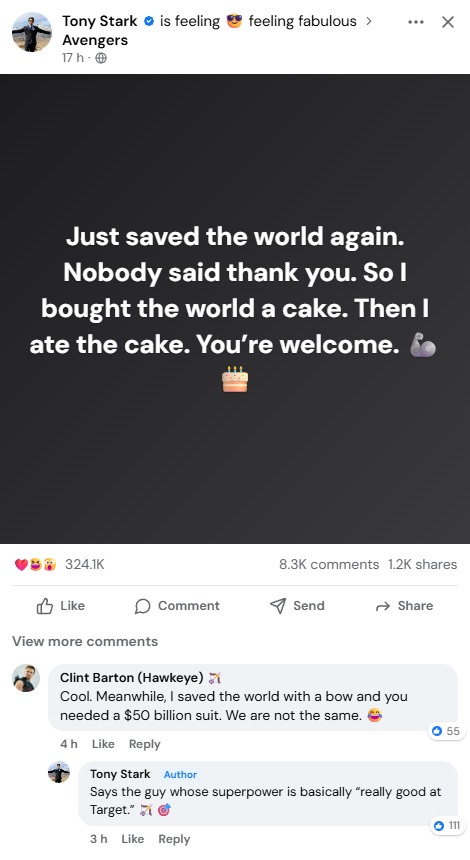
Watch It in Action
See how easily you can create and preview Facebook posts.
How To Tell If A Facebook Post Or Screenshot Is Fake?
A few checks separate a real feed screenshot from a generated mockup.
Open The Source
Search the profile or page on Facebook directly, since a genuine post still exists there.
Read The Numbers
Odd combinations, such as huge shares with almost no reactions, rarely happen on real posts.
Study The Edges
Cropped screenshots that hide the top bar or comment area often hide the giveaway too.
Compare The Details
Fonts, spacing, badge placement, and timestamp wording shift slightly in an edited image.
Trace The Image
A reverse image search shows where the same picture appeared earlier and in what context.
Everything This Facebook Post Maker Can Control
Each control exists because real posts differ in small, visible ways.
Six Reaction Types
Like, love, haha, wow, sad, and angry stack in overlapping circles like the feed.
True Photo Grids
Two, three, four, or more images fall into the app’s own collage layouts.
Threaded Replies
Replies nest under comments, and author replies carry the blue Author label automatically.
Colored Text Cards
Text-only statuses sit on gradient backgrounds with large centered white lettering.
Editable Status Bar
Clock, battery level, signal bars, network type, and charging state adjust inside phone frames.
Export Settings
Save at 1x, 2x, or 3x on a feed, white, or transparent background.
Why This Beats Editing A Screenshot By Hand?
Faking one post in an image editor means hours of careful pixel work.
No Manual Alignment
Bubbles, badges, and grids draw themselves instead of being measured and placed layer by layer.
Instant Corrections
One typo takes a second to fix here, not a rebuild of flattened image layers.
Files Stay Local
Photos and videos are read on the device, never sent to a server for processing.
Drafts Come Back
Text and settings reload on the next visit, so nothing has to be retyped.
Tips For Making The Post Look Convincing
Small choices decide whether a mockup reads as believable or obviously staged.
Keep Ratios Sensible
Comments usually run far below reactions, and shares stay lower than both.
Trim The Caption
Short text with a natural cut-off matches how long posts appear in the feed.
Match The Device
Dark mode paired with a realistic clock and battery level suits a phone screenshot.
Vary The Voices
Different commenter names, photos, and reply times feel closer to a real thread.
Usage Policy
This site is not responsible for images produced by its users. By using this Facebook post generator, every user agrees to act lawfully and ethically, including, but not limited to, complying with the following rules:
- Mockups created here must never be used to impersonate, harass, threaten, or damage the reputation of any person, brand, or organisation.
- Nothing made with this tool should be shared as a genuine screenshot or as proof of a real statement or event.
- Each user carries full responsibility for the images produced and for following local law and platform rules when sharing them.
Questions People Ask
Yes. The controls, preview, and download button are built for small screens, so a full mockup can be made on mobile.
No. The tool never connects to Facebook, needs no login, and cannot publish anything to the platform.
No. The wording comes from the person using it, which keeps full control over tone and message.
Yes. A reset button clears the editor back to its starting example, ready for the next design.
A standard PNG image, which opens in any browser, phone gallery, document, or presentation app without conversion.
You May Also Like
Instagram Post Generator
Create a realistic Instagram post, reel, or carousel mockup and export it as an image.

Instagram Story Generator
Create a realistic Instagram story mockup from the viewer or owner side and export as an image.

YouTube Community Post Generator
Create realistic YouTube community post mockups with polls, images, likes, comments & dark mode.

LinkedIn Post Generator
Create a realistic LinkedIn post mockup and download it as an image.

Fake Tweet Generator
Create realistic fake tweets instantly for pranks or memes.

Fake Threads Post Generator
Create realistic, customizable Threads posts for pranks, marketing, or creative mockups.
