
YouTube Community Post Generator
Design a realistic YouTube community post: text, image, or poll and download it as an image.
The preview is the export, what you see here is exactly what saves.
About This Tool
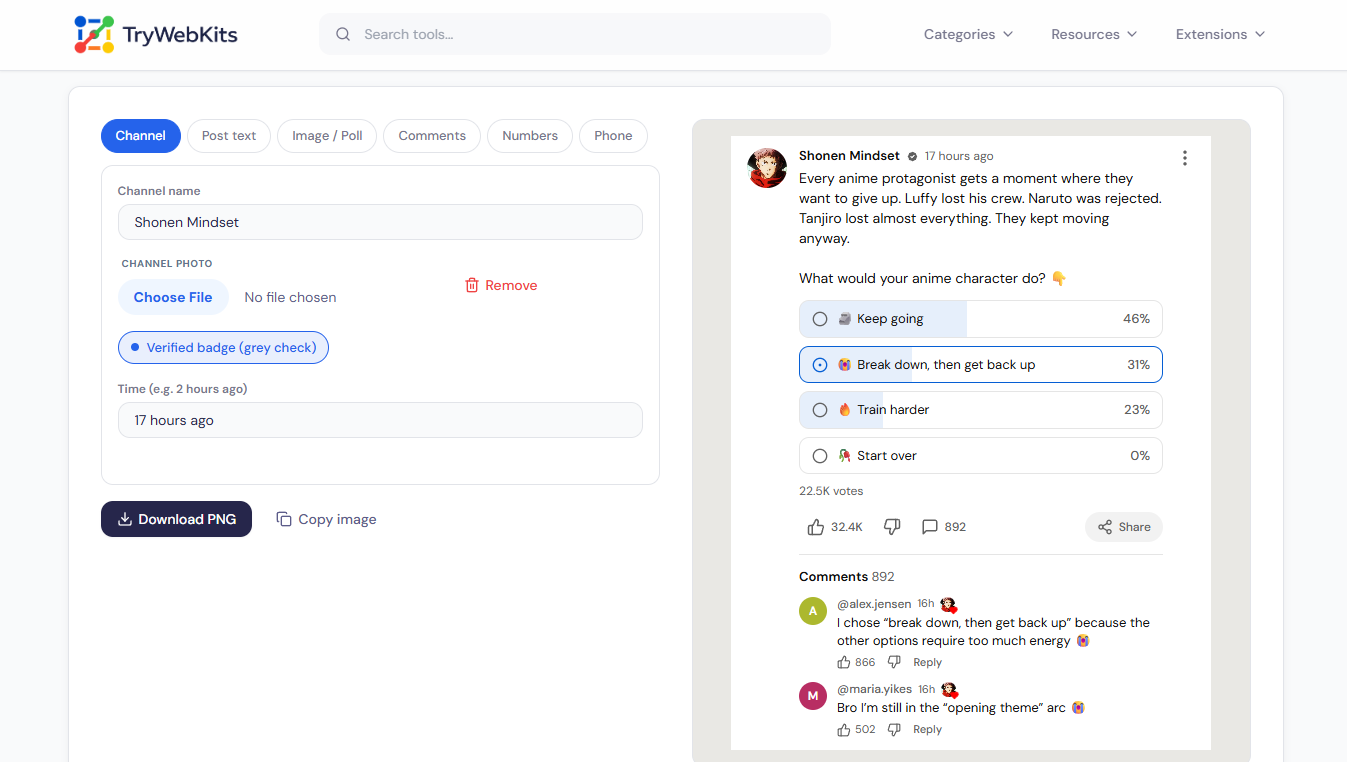
This YouTube post generator recreates the community tab card so a post can be designed without touching a real channel. It handles plain text, text with a picture, or a poll, under an editable channel name, profile photo, verified check, and posting time. A comment thread can sit beneath the card, complete with replies from the creator. Everything renders live, meaning the preview on screen is always exactly what exports. Once the layout looks right, the finished design saves as a sharp image, ready for a video, a chat, or a slide.
How To Use The YouTube Community Post Generator?
A finished mockup takes only a couple of minutes to build.
- 1
Open the Channel tab and set the name, photo, badge, and post time.
- 2
Write the post in the Text tab; up to 2,000 characters fit.
- 3
Switch to Image / Poll to attach a picture or build poll options.
- 4
Add comments and replies, then set the likes and vote figures under Numbers.
- 5
Pick light or dark and a screenshot style from the Phone tab.
- 6
Press Download YouTube Screenshot, or hit Copy screenshot to paste it straight into anything.
Where A Fake YouTube Community Post Helps?
A convincing community post preview is useful far beyond pranks.
Content Planning
Creators can check how an idea or poll will read before publishing on the channel.
Tutorials And Thumbnails
A staged post makes a clean visual for explainer videos, guides, and channel walkthroughs.
Memes And Skits
Invented channels, absurd polls, and over-the-top comment threads turn into shareable jokes quickly.
Client Approvals
Social media managers can present a drafted post for sign-off before anything goes public.
Core Capabilities Of The YouTube Post Generator
Every element on the card can be adjusted to match the scene.
Working-Style Polls
Two to six options with free percentages, a marked vote, and hideable results.
Layered Comments
Up to ten entries with creator hearts, name chips, likes, and nested replies.
Auto-Blue Tags
Hashtags, mentions, and links turn YouTube-blue automatically while the post is written.
Real Phone Screenshots
An iPhone or Android capture with editable clock, battery, signal, and network.
Compact Counters
Likes, comments, and votes display as however you like, matching the app.
Flexible Exports
Output at 1x to 3x size, on a feed, white, or transparent background.
Why Pick This Generator Over Manual Edits?
Editing a real screenshot by hand rarely survives a close look.
Pixel-True Detail
Fonts, spacing, badges, and icons match the app, so nothing gives the edit away.
Always Editable
A saved draft reopens on the next visit, instead of redoing image edits.
Private By Design
Photos and text stay in the browser and are never uploaded anywhere.
Free Without Limits
No account, watermark, or cap, unlike most mockup sites and photo editors.
Usage Policy
This site is not responsible for content created by its users. By using this YouTube Community Post Generator, every user agrees to use the tool lawfully and ethically, including, but not limited to, complying with the following rules:
- Generated community posts must never be used to harass, attack, threaten, slander, disparage, intimidate, or otherwise harm any person or entity.
- Generated posts must never be used to spread false information, misinformation, or deceptive claims that could negatively affect anyone's life or reputation.
- The tool is intended for harmless creativity, content planning, previews, and entertainment, not for impersonation, deception, or misleading others.
Frequently Asked Questions
No. It never connects to YouTube or asks for a login. It only draws a picture of a post; nothing real is created or changed.
For memes, demos, and planning, yes. Presenting a made-up post as genuine to mislead people or damage a channel is not an acceptable use.
Yes. A toggle trims anything past 180 characters and adds the grey …Read more cutoff, exactly how YouTube collapses longer posts.
Yes. The saved file uses whichever theme is active, and phone screenshots switch the status bar colours along with it.
Square 1:1, classic 4:3, and wide 16:9, each cropped with the rounded corners YouTube applies to attached pictures.
Yes. One press of the Now button stamps the device's current time into the screenshot.
You May Also Like

YouTube Thumbnail Downloader
Download high-quality YouTube video and Shorts thumbnail instantly.
Instagram Post Generator
Create a realistic Instagram post, reel, or carousel mockup and export it as an image.

Instagram Story Generator
Create a realistic Instagram story mockup from the viewer or owner side and export as an image.

Fake Tweet Generator
Create realistic fake tweets instantly for pranks or memes.

Fake Threads Post Generator
Create realistic, customizable Threads posts for pranks, marketing, or creative mockups.
