PNG To JPG Converter
 PNG To JPG Converter
Convert PNG images to JPG online, with quality and background options.
Files are converted on this device and never uploaded to any server.
About This Tool
The PNG to JPG Converter turns PNG images into smaller JPG files directly in the web browser. One image or a whole batch can be added at once, and the quality, the background color, and the maximum size can be set before converting, with no account needed.
Transparent areas are filled with the chosen background, white by default. Only PNG files are accepted, and each converted file keeps the name of its PNG, shows its new size, and can be saved on its own or in a ZIP.
How To Convert PNG To JPG?
Converting PNG files to JPG takes only a few clicks.
- 1
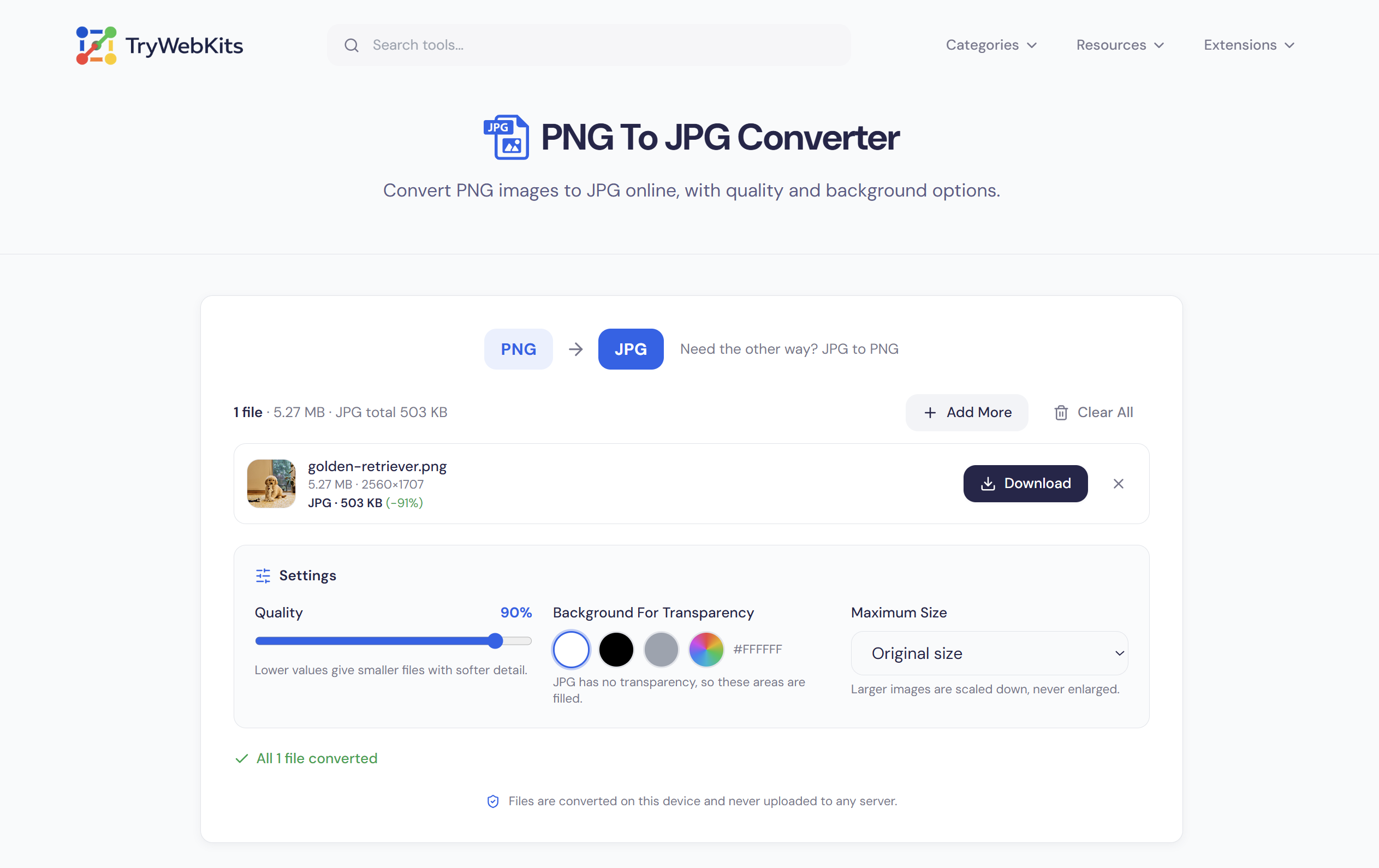
Press Select Files or drag PNG images onto the converter to add them.
- 2
Move the quality slider, where lower values give smaller files and softer detail.
- 3
Choose a background color for transparent areas, which is white by default.
- 4
Press Convert, then compare the new file size shown beside each image.
- 5
Download single files or use Download All to save everything as one ZIP.
How This PNG To JPG Converter Works?
Each PNG is decoded by the browser and drawn onto a canvas that is first filled with the chosen background color. The canvas is then encoded as a JPG at the selected quality.
Conversion runs file by file, and a PNG the browser cannot read is flagged on its own row without stopping the others. Cancel ends the batch after the file in progress.
Images Never Leave The Device
Screenshots, scans, and design files are converted inside the browser, so nothing is uploaded to TryWebKits or any other server. Text, EXIF, and XMP data stored inside the PNG are not copied to the JPG, and nothing is stored once the tab closes.
PNG Vs. JPG: What's The Difference?
Each format has strengths, and the differences explain what changes during conversion.
| Feature | PNG | JPG |
|---|---|---|
| Full Name | Portable Network Graphics | Joint Photographic Experts Group, also called JPEG |
| Compression | Lossless, nothing is discarded | Lossy, with an adjustable quality level |
| Transparency | Supported with an alpha channel | Not supported |
| File Size | Larger, often several times for photos | Smaller for photos, less so for flat graphics |
| Best For | Logos, line art, and graphics with text | Photographs |
Features Of This PNG To JPG Converter
Quality control, a background color, and a ZIP download in one place.
Quality Slider
A slider from 10 to 100 percent balances file size against picture detail.
Background Color
Transparent areas are filled with a chosen color, white by default, before saving.
Batch Conversion
Several PNG files convert in one run, and each result gets its own row.
Optional Resizing
A maximum size caps the longest side while keeping the original proportions.
Size Comparison
Each result shows the new file size and the percentage change from the original.
ZIP Download
Converted images can be saved one by one or all together in a ZIP file.
When To Convert PNG To JPG
A smaller JPG makes these everyday tasks quicker and easier.
Upload Forms
Many upload forms limit file type or size, and a smaller JPG often helps.
Email And Chat
Lighter JPG files stay under email attachment limits and send faster than large PNG files.
Website Images
Photos saved as JPG keep web pages lighter, which helps them load faster.
Screenshot Sharing
Photo-heavy screenshots often shrink a lot as JPG, which makes them quicker to share.
Slides And Documents
Photos saved as JPG usually keep slides and documents smaller than PNG copies would.
Photo Storage
Folders of PNG photos usually take much less disk and cloud space as JPG.
Frequently Asked Questions
Slightly. JPG is a lossy format, so some fine detail is discarded. A quality of 90 or higher keeps the loss hard to notice.
JPG cannot store transparency, so transparent pixels are filled with the chosen background color before saving. White is the default.
Around 80 to 90 percent suits most photos. Screenshots with text need a higher value to avoid fuzzy edges, and 100 gives the largest file.
No exact size can be set. A lower quality setting and a smaller maximum size both shrink the file, so a few trial runs find the right balance.
No. Once transparency is replaced by a color, it is gone. The original PNG should be kept if a transparent version is needed later.
Up to 25 PNG files per batch, with each file up to 50 MB. Larger sets can be converted in several rounds.
Any modern browser on a computer, phone, or tablet. Very large images can fail on phones with limited memory, and a smaller maximum size helps.
You May Also Like

Image Compressor and Resizer
Reduce image size and resize photos quickly without losing quality.

Image to PDF
Combine JPG, PNG, and WebP images into one PDF, privately in browser.

Image Background Remover
Remove backgrounds from images online with AI assistance.

Metadata Remover
Strip EXIF, GPS, author info, and hidden metadata from photos, videos, and PDFs to protect your privacy before sharing.

EXIF Data Viewer
Extract GPS location, camera settings, timestamps, and all metadata from photos and videos. Privacy scanner included!