
Metadata Remover
Strip EXIF, GPS, author info, software fingerprints, IPTC tags, XMP, ICC profiles and more, from photos, videos and PDFs. Pick exactly what to remove, or wipe everything in one click.
Drag & drop a file here, or click to upload
JPEG · PNG · HEIC · WebP · AVIF · TIFF · GIF · MP4 · MOV · PDF
Up to 100 MB · Files never leave your device
What Is Image Metadata And How To Remove It?
This online tool provides a simple way to erase hidden information embedded within digital files. Every time a photo is taken or a document is saved, the file stores extra technical details, this is called metadata. This can include precise GPS location, camera model, date and time, and even the software used. This meta data cleaner reads those records, displays them in plain groups, and deletes the ones selected. It supports JPEG, PNG, HEIC, WebP, AVIF, TIFF, GIF, MP4, MOV, and PDF files. The result is a clean file with the same pixels, the same playback, and none of the personal traces left behind in the original.
Simple Steps To Erase EXIF And File Data
Cleaning a file takes three short steps and no setup at all.
- 1
Upload a photo, video, or PDF, or drag the file into the box.
- 2
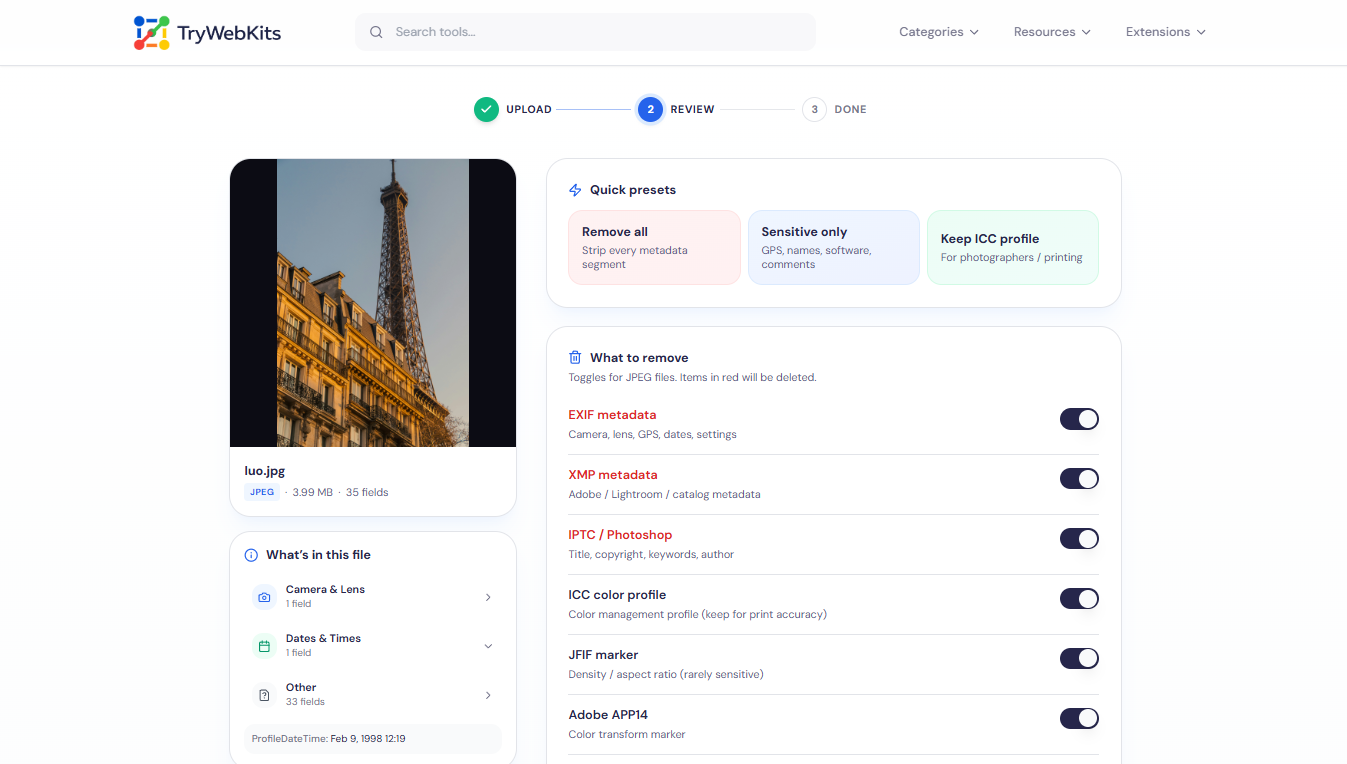
Review the detected metadata, sorted into location, camera, date, and other groups.
- 3
Pick fields to delete, or choose Remove All to clear everything at once.
- 4
Download the cleaned file, plus the original metadata as JSON if a backup is needed.
See It In Action
Watch this 20-second guide to clean EXIF, GPS, and hidden data from any file.
Why Remove Metadata?
Keep file data private by removing hidden detail before share
Location Privacy
GPS coordinates inside a photo can reveal a home, a workplace, or a daily route.
Identity Protection
Camera serial numbers and computer names quietly link separate files back to one owner.
Safer Sharing
Public uploads on forums and marketplaces often expose details meant to stay private.
Cleaner Documents
PDFs sent to clients often carry author names and software details better left out.
Smaller Files
Stripping bulky EXIF and XMP segments trims file size before uploading or emailing anything.
Professional Control
Journalists and lawyers handling sensitive files need every hidden trace fully gone.
Unique Features Of Our Metadata Remover
Easy tool to clean file and remove hidden data quickly
Per-field Control
Manual editing needs separate apps per format; here one screen handles every supported type.
Lossless Cleaning
Unlike screenshot workarounds, JPEG and PNG cleaning keeps every pixel exactly intact.
All Formats Covered
Desktop programs rarely handle photos, video, and PDF together in a single place.
Metadata Backup
Saving original fields as JSON beforehand removes the guesswork of permanent manual deletion.
Data Security
All processing runs inside the browser. Files are handled locally on the device and never uploaded to a server. No account is required, nothing is logged, and no copy is kept anywhere. Once the page has loaded, the tool keeps working even without an internet connection.
Quick Help Guide
No. JPEG and PNG cleaning keeps pixels untouched. Other formats are re-encoded with no visible quality loss.
Once a cleaned file is saved, the deleted fields are gone from that copy and cannot be restored.
Since everything is processed in the browser, large videos depend on the device's available memory rather than a fixed cap.
Yes. It runs on phones, tablets, laptops, and desktops through any modern browser, with no app to install.
Yes. The tool is free to use, with no sign-up, no watermark, and no download required.
MP4 and MOV files are cleaned by replacing metadata atoms with empty placeholders, so playback stays unaffected.
You May Also Like

Metadata Editor
Edit EXIF, GPS, copyright, dates and more on JPEG, PNG and PDF files. Add unlimited custom fields.

EXIF Data Viewer
Extract GPS location, camera settings, timestamps, and all metadata from photos and videos. Privacy scanner included!

Image Compressor and Resizer
Reduce image size and resize photos quickly without losing quality.

Paste Image To Download
Paste clipboard to save screenshots and copied images as files.

QR Code Generator
Create QR codes for URLs, text, WiFi, and more

URL Unshortener
Instantly expand the shortened links before clicking them to protect yourself from malware and phishing.
