
Metadata Editor
See every metadata field your file actually contains. Rename, edit, delete, or add brand-new fields with any name you want. Your file, your rules. All in your browser.
Drop a JPEG, PNG, or PDF — or tap to browse
See and edit every field. Up to 100 MB.
Files never leave your device · Pixel-perfect output
About This Tool
The Metadata Editor is a web-based tool for viewing and changing the hidden data stored inside image and PDF files. Every JPEG, PNG, and PDF carries fields such as camera model, author, dates, GPS location, and software notes. This meta data editor reads all of them and lists each one as an editable row. Fields can be changed, renamed, removed, or created with any name. Once edits are done, the tool builds a fresh copy of the file ready to download. It runs fully in the browser, so this file metadata editor is available on any desktop, laptop, tablet, or phone.
How To Edit Metadata?
Editing metadata takes a few short steps and no installs.
- 1
Open the tool and drop a JPEG, PNG, or PDF onto the page.
- 2
The metadata editor online reads the file and lists every field it holds.
- 3
Edit any value, rename a key, or delete fields that are not needed.
- 4
Tap Add to create new fields with any name and value.
- 5
Press Save, then download the edited file to the device.
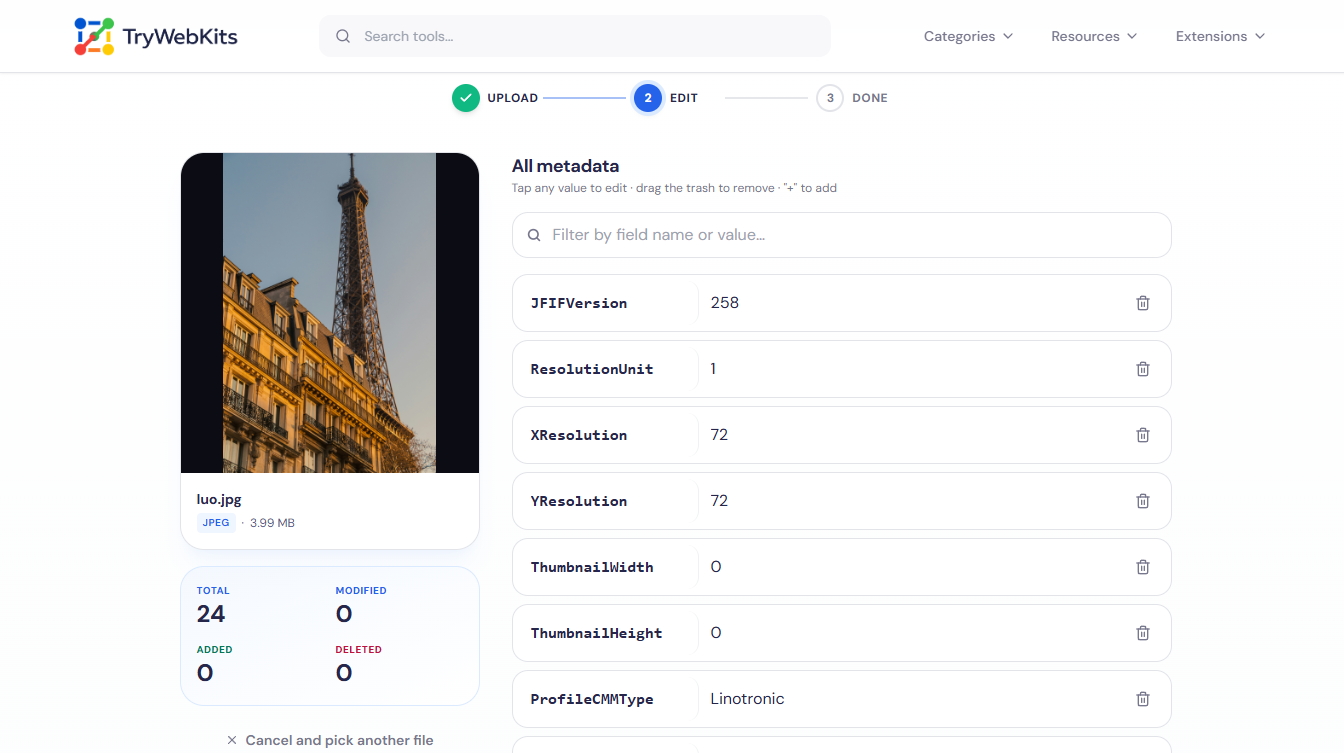
How It Looks In Action
A short 31-second clip showing the full edit-and-save flow.
Key Features Of Our Metadata Editor
Our online metadata editor tool provides a comprehensive set of functions to ensure complete control over your file data.
Full Field View
Every EXIF, XMP, IPTC, PDF Info, and PNG text field appears, not a short preset list.
Wide Format Support
Works as a pdf metadata editor and a photo metadata editor for JPEG and PNG files alike.
Custom Fields
Type any field name and value, useful for ratings, project tags, or personal notes.
Clean Deletion
Remove unwanted fields with a single tap before saving, with no confirmation prompts in the way.
Pixel-safe Output
Image content stays byte-for-byte identical; only the metadata sections of the file are rewritten.
Mobile-ready Layout
Large tap targets and a sticky save bar keep editing simple on phones and tablets.
Why Choose TryWebkits's Metadata Editor Tool?
Choosing the right utility for work is essential. Our platform focuses on providing a clean, practical, and highly secure environment for all users.
No Software Install
Editing metadata by hand needs desktop apps; this tool runs in any browser instead.
Faster Than Command Lines
Tools like ExifTool need typed commands, while here every field is an editable on-screen row.
All formats, One Place
Skip separate apps to edit image metadata and PDF data; one editor handles all three together.
Clear Change Tracking
A live counter shows added, modified, and deleted fields, so nothing slips through unnoticed.
Help Guide
Yes. Deleting every field before saving produces a file with little or no remaining metadata attached.
For files, editing metadata fields (like title, description) provides search engines with relevant content context for better indexing and improved online visibility and ranking.
Yes. The tool provides granular control to view, edit, or remove EXIF data, including sensitive details like camera model, shutter speed, and GPS location completely.
Yes, the editor can precisely locate and eliminate location data (EXIF GPS) from image files, a crucial step for maintaining personal privacy and security online.
You May Also Like

Metadata Remover
Strip EXIF, GPS, author info, and hidden metadata from photos, videos, and PDFs to protect your privacy before sharing.
EXIF Data Viewer
Extract GPS location, camera settings, timestamps, and all metadata from photos and videos. Privacy scanner included!

Image Compressor and Resizer
Reduce image size and resize photos quickly without losing quality.
Paste Image To Download
Paste clipboard to save screenshots and copied images as files.

QR Code Generator
Create QR codes for URLs, text, WiFi, and more
URL Unshortener
Instantly expand the shortened links before clicking them to protect yourself from malware and phishing.
