Video background
remover.
Remove, replace, erase or swap any video background for a green screen, a colour, or your own image or video in full quality. No login, no watermark.
Drag & drop or click · MP4, WebM, MOV · never leaves your device
One-click Background Removal For Any Video
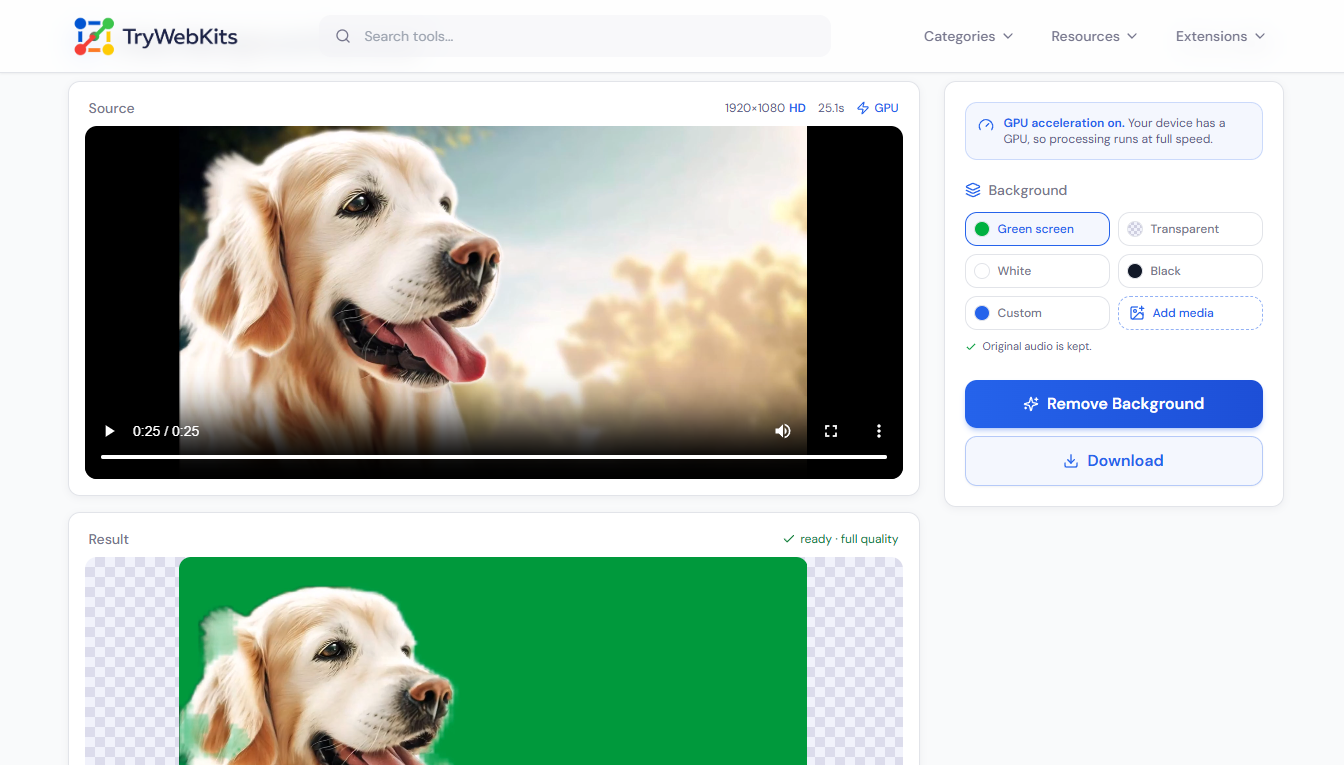
Our video background remover takes the background out of any clip without a green screen, a studio, or editing experience. Upload a file, and the tool separates the subject from the scene one frame at a time, then drops in a fresh background of choice. Everything runs inside the browser on desktop, laptop, tablet, and phone, so there is nothing to download or sign up for. The finished clip keeps the resolution of the original and saves with no watermark. It is built for quick, repeatable edits, social clips, product shots, talking-head videos, and anything that needs a cleaner or different backdrop.
How To Remove The Background From A Video?
Three short steps turn any clip into a clean cutout.
- 1
Add a video by dragging it in or choosing a file from the device.
- 2
Pick a new background media, color, or set it to transparent.
- 3
Click Remove Background and wait while each frame is processed.
- 4
Play the preview, then download the clip with no watermark.
See it in Action
Watch this demo to know how to use this tool.
How Does This Video Background Remover Works?
Each frame is cut out by AI inside the browser, the video never leaves the device.
Add A Clip
Upload an MP4, WebM, or MOV. The video is decoded locally and is never uploaded to an online server.
Model Loads Once
The first run fetches Google’s open-source AI segmentation model from a CDN, only the model, never the footage.
Background Removed
Every frame runs through the AI on the device and is placed on a green screen, colour, transparent, or custom background.
Export And Download
Frames are captured with none dropped and saved as a high-quality WebM, free and with no watermark.
What leaves the device: only the one-time AI model downloaded from a CDN.
What never leaves: the video, processed fully in the browser, a private, online video background remover with no upload.
What This Video Background Remover Can Do?
AI video background removal for creators, marketers, and businesses.
Any Background
Swap in a green screen, a solid colour, or an uploaded photo or video of any kind.
Full Resolution
Output keeps the original size, so a 4K or HD clip stays exactly that sharp.
Transparent Export
Save a transparent WebM with a clear alpha layer to drop over any project.
Every Frame Kept
Frames are captured one for one, with nothing skipped, duplicated, or knocked out of sync.
Audio Stays
The original sound is kept on colour, image, and video backgrounds without extra steps.
Free, No Watermark
Download finished clips free, with no sign-up and no branding stamped on top.
TryWebKits Vs Apps, Software, And Manual Editing
See how TryWebKits compares to mobile apps, desktop tools, and manual editing.
| What matters | Trywebkits | Phone Apps | Software (Adobe, Canva) | By hand |
|---|---|---|---|---|
| Price | Free, no limits | Often behind a subscription | Paid plan or full licence | Free but very slow |
| Setup | Runs in the browser, nothing to install | App download and sign-up | Large install and an account | No tool, manual masking |
| Green screen | Not required | Sometimes required | Sometimes required | Hard without one |
| Uploads | No server uploads | Files sent to a server | Sent to the cloud server | Stays local |
| Watermark | None | Common on free tiers | None on paid tiers | None |
| Effort | One click per clip | Several steps and exports | Steep learning curve | Frame by frame, hours of work |
Private By Design
Every part of the background removal happens on the device. The moment a clip is added it is decoded and processed inside the browser, and it is never sent to Trywebkits or any outside server. There is no upload step and no copy of the footage sitting in the cloud. The single file that travels over the network is the AI model that powers the cutout, which loads from a content delivery network so it can run locally, the footage itself never goes with it. That makes the tool safe for private recordings, client work, and anything that should not leave the device.
Frequently Asked Questions
MP4, WebM, and MOV files all work. The tool reads them in the browser and saves the result as a WebM file.
Yes. It runs in mobile and tablet browsers, though a desktop with a GPU processes clips noticeably faster.
No. It clears the visual background, not audio. The original sound is kept on solid, colour, image, and video backgrounds.
WebM export works in Chrome, Edge, and Firefox on desktop. Safari cannot export WebM yet.
WebM is the only common format that supports a transparent video layer, so the export uses it.
You May Also Like

Video To GIF Converter
Convert videos to GIFs quickly. Add watermark, text, crop, and adjust frame rates.

Video Compressor Online
Reduce video file size quickly without losing quality for faster sharing and uploading.

YouTube Thumbnail Downloader
Download high-quality YouTube video and Shorts thumbnail instantly.

EXIF Data Viewer
Extract GPS location, camera settings, timestamps, and all metadata from photos and videos. Privacy scanner included!

Number Picker Wheel
Spin to decide! A customizable random number & name picker for raffles, games, and fair draws.

Fake Threads Post Generator
Create realistic, customizable Threads posts for pranks, marketing, or creative mockups.
