Bulk Image Alt Text Generator
Describe up to 100 images at once with on-device AI, short, medium or long, with three wordings and an SEO score for each.
Speed depends on your device, since the AI runs locally. You can add up to 100 images, but we recommend about 10 at a time for the smoothest experience especially on phones or laptops without a dedicated GPU.
About This Tool
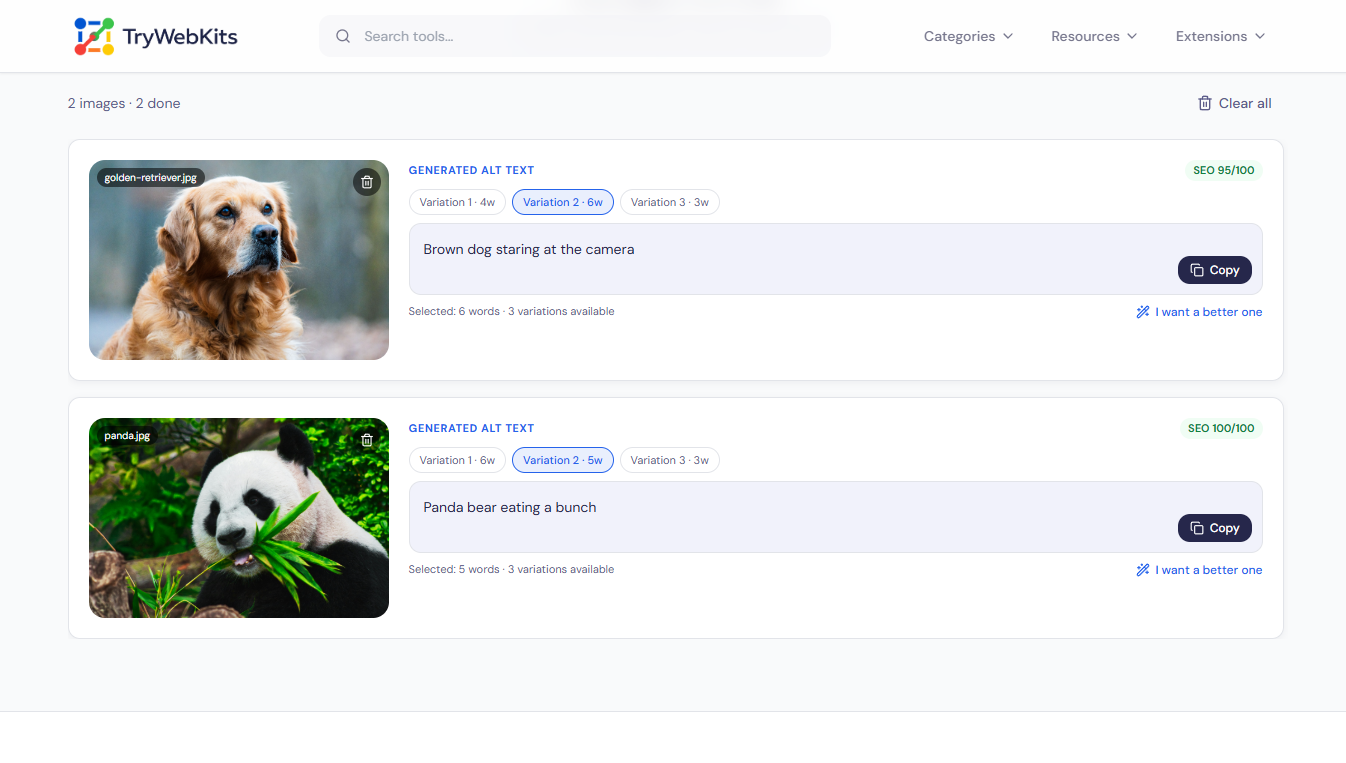
The Bulk Image Alt Text Generator writes alternative text for many pictures in a single pass. Alt text is the short description that screen readers read aloud and search engines record, so it shapes both accessibility and ranking. This tool reads each image directly inside the browser and drafts a clear description for it. It handles a full gallery at one time, offers a few length choices, and lays out every result in its own card. Each description can be reviewed, selected, and refined before use. It suits anyone managing product photos, blog visuals, or large media libraries.
How To Use This Bulk Image Alt Text Generator?
Generating alt text in bulk takes only a few simple steps.
- 1
Add up to 100 images by dragging them in or selecting them from the device.
- 2
Pick a description length: short, medium, or long, to match the need.
- 3
Press Generate and let each image process one after another.
- 4
Open any card and choose the wording that fits best.
- 5
Copy a single result or export everything as a spreadsheet file.
Core Capabilities Of Our Bulk Image Alt Text Generator
Handle numerous pictures at once while maintaining clear, high-standard descriptive phrasing.
Bulk Handling
Process up to one hundred images together instead of describing each picture on its own.
Length Choices
Choose short, medium, or long output so each description suits its placement and purpose.
Multiple Wordings
Receive three separate drafts per image and select the one that reads most naturally.
Quick Scoring
A simple score flags weak phrasing and rewards clear, descriptive wording for stronger results.
Spreadsheet Export
Download every filename alongside its drafts in clean columns ready for any spreadsheet work.
Fresh Drafts
Request a new set of wordings whenever a result needs a different angle or tone.
Why Choose Our Bulk Alt Text Generator?
Manual alt text drains hours; this tool clears the same workload in minutes.
Batch In Bulk
Handle one hundred images in a single run instead of opening and captioning each one.
Choice Per Image
Compare several drafts and select the best fit, rather than settling for one rushed line.
Export Ready
Send every result to a CSV at once instead of copying captions one by one.
More Drafts Fast
Tap "I want a better one" to add three fresh alt text drafts quickly.
Private By design
Every image stays on the device from start to finish. The pictures are read and described locally inside the browser, so nothing is sent to a server and nothing is uploaded. Only a one-time model file is fetched so the tool can run, and it caches for the session. No images are stored, logged, or kept after the tab closes, which keeps private and client work fully protected.
Frequently Asked Questions
Yes. The bulk image alt text generator is free to use, with no account or subscription required for any batch.
It supports common formats like JPG, PNG, and WebP. SVG files are not accepted, so convert them to a raster format first.
A connection is needed for the first load. After the model caches, most processing continues even on a weak or dropped connection.
Yes. Each draft is a strong starting point, copy it, then adjust the wording so it matches the exact context of the image.
A retry option appears on that image’s card. Press it to run the description again without affecting the other images in the batch.
Each image starts with three variants. If none fit, press "I want a better one" to instantly add three more, giving six wordings to pick from.
Around ten at a time runs most smoothly, since the work happens on the device. Larger batches still work but may take longer.
You May Also Like

Image Compressor and Resizer
Reduce image size and resize photos quickly without losing quality.

QR Code Generator
Create QR codes for URLs, text, WiFi, and more

Metadata Editor
Edit EXIF, GPS, copyright, dates and more on JPEG, PNG and PDF files. Add unlimited custom fields.
Image to GIF Converter
Convert Images into a high-quality GIF. Arrange frames, add watermark, text, and adjust speed.
