CSV To JSON Converter
Convert CSV data to JSON online, with delimiter, header, and type options.
.csv files only
Preview
Paste or upload a CSV file above to see a live preview here.
About This Tool
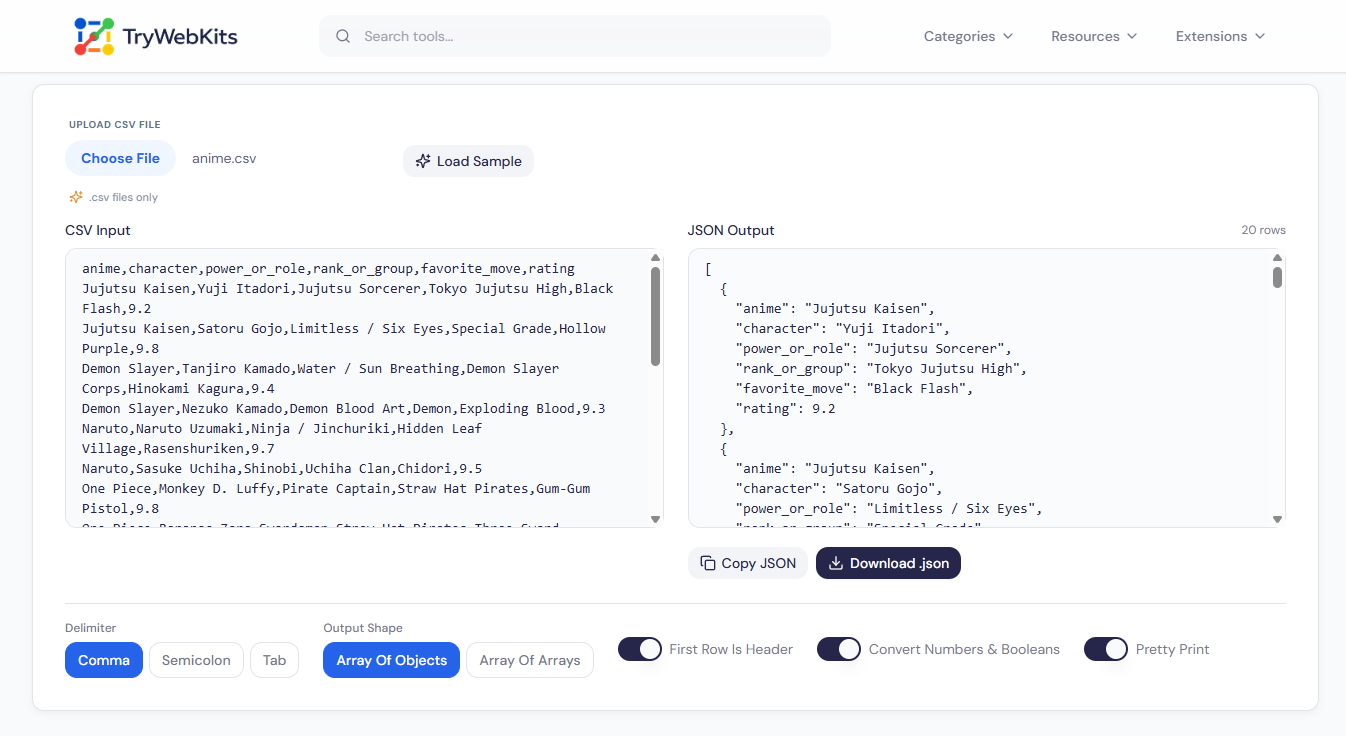
This CSV to JSON converter turns the contents of a spreadsheet export into JSON directly in the browser. Pasted text or an uploaded .csv file is converted as the data changes. The output can be an array of objects, with the header row supplying the keys, or a plain array of arrays, and a pretty print switch decides whether the JSON is indented for reading or kept compact.
How To Convert CSV To JSON?
Turning a spreadsheet export into JSON takes only a few clicks.
- 1
Paste the CSV text into the input box, or upload a .csv file instead.
- 2
Pick the delimiter that matches the file, then decide whether the first row holds headers.
- 3
Choose an array of objects or arrays, and switch number conversion on or off.
- 4
Check the JSON as it updates, then copy it or download it as a file.
Functions Of This CSV To JSON Converter
Options that cover the delimiter, header row, and output shape.
Quoted Field Support
Commas, line breaks, and escaped quotes inside quoted fields stay part of the value.
Custom Delimiters
Choose comma, semicolon, or tab to match how the source file separates its columns.
Header Row Toggle
Use the first row as JSON keys, or generate column names such as column_1 automatically.
Type Conversion
Numbers, true, false, and null are converted from text into matching JSON types.
Live Preview Table
Parsed rows appear in a table under the converter, so columns are easy to check.
Copy Or Download
The result copies to the clipboard or saves as a converted.json file in one click.
Frequently Asked Questions
Switch off Convert Numbers & Booleans. Every value then stays text, so 00123 is not turned into the number 123.
Missing values become empty strings. Extra values are dropped in the array of objects shape and kept in the array of arrays shape.
No, the table shows the first 8 rows. The JSON output always includes every row.
Not directly. The upload accepts .csv files, so an Excel sheet needs to be saved as CSV first.
No limit is set by the tool, though very large files take longer to convert and preview.
You May Also Like

JSON Formatter & Validator
Format, validate, beautify, and analyze JSON data online with readable structure and syntax checking.
CSV Viewer Online
View, search, edit and analyze CSV files and spreadsheets directly in browser.
XML Formatter & Validator
Format, validate, beautify, and minify XML data online with syntax checking and structured output.

URL Unshortener
Instantly expand the shortened links before clicking them to protect yourself from malware and phishing.

QR Code Generator
Create QR codes for URLs, text, WiFi, and more
