Image to PDF Converter
Turn your images into PDFs. Free, easy to share, and completely private.
- Free to use, no sign-up to try.
- No subscription needed.
- Files never leave your device.
Your images are converted on your device and never uploaded to any server.
Your images become one shareable PDF
About This Tool
The Image to PDF Converter turns a set of pictures into one PDF document. Instead of sending several photos as separate attachments, the whole batch becomes a single file that is simple to send, keep, or pass on. It suits everyday tasks such as turning phone snaps of a contract into one record, bundling scanned receipts for an expense claim, saving a screenshot thread, or handing in photographed homework as a tidy file. Holding related pictures in one document also makes them far easier to store and find later than a scattered folder of single images. Most batches are ready in just a few seconds.
How To Convert JPGs To PDF Files Online?
Building a PDF from images takes only four quick steps.
- 1
Drop images onto the box, or click to pick several at once.
- 2
Arrange the list into the right order with the up and down controls.
- 3
Set the page size that best suits the images.
- 4
Click Create PDF to save one document holding every image.
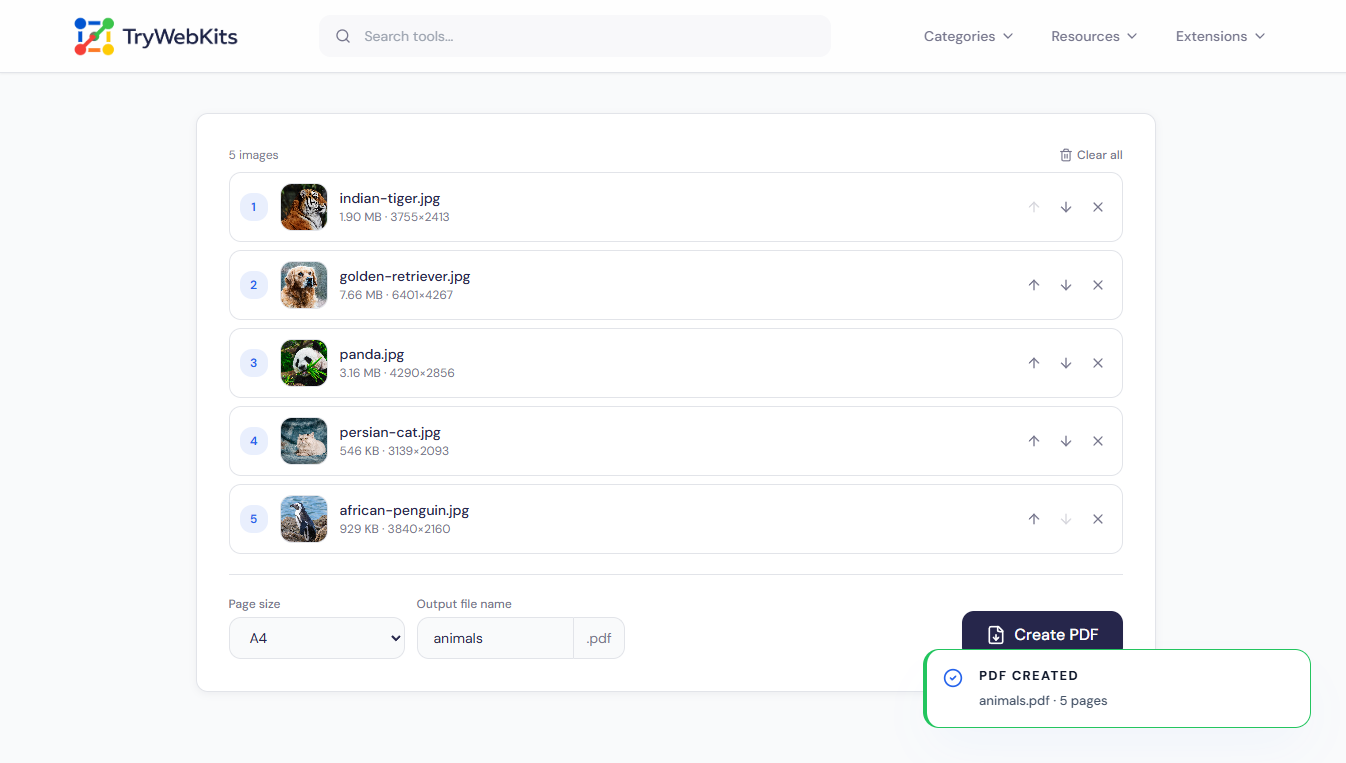
Turn Photos, Scans, And Screenshots Into PDFs
Each setting exists to shape the finished document to its purpose.
Page Per Image
Every picture lands on a page of its own, with nothing cropped or stacked together.
Mixed Formats Welcome
JPG, PNG, WebP, GIF, and BMP can all go into the same document.
Fit Or Standard
Match each page to its image, or use a standard A4 or Letter page.
Full Image Quality
JPG and PNG keep full quality, while other formats stay at their original resolution.
Custom File Name
Name the document before saving, so the right file is easy to spot later.
Auto Orientation
On the standard sizes, each page turns portrait or landscape to suit its image.
Why Choose This Over Manual Methods
Doing this by hand is slow and rarely looks tidy.
Nothing To Install
The converter runs in any browser tab, with no app or plugin to set up.
All At Once
A full batch becomes a PDF in one step, not one picture at a time.
Free, No Catches
No account, no watermark, and no email needed before the file is saved.
Phone To Desktop
The same tool works on phones, tablets, laptops, and desktops with no change.
Data Security
Every PDF is built locally, inside the browser, using the device’s own memory. The images are read straight from the device and assembled into the document there, so nothing is uploaded to a server or held on one. As soon as the tab closes, the temporary working data clears, leaving no copy behind.
Frequently Asked Questions
There is no fixed limit. Large, high-resolution sets use more device memory, so very big jobs depend on the device, but everyday batches are fine.
No. The source files stay on the device unchanged; only copies are read while the PDF is being built.
Yes. One picture creates a one-page PDF, in the same way a group creates a multi-page file.
Yes. It is a standard PDF, so any reader or editor can open, annotate, sign, or print it.
PDFs handle JPG and PNG directly, so other formats are switched to PNG inside the browser, with no loss of resolution.
On the standard sizes, each image sits inside a small, even margin; the fit option adds none and fills the page fully.
You May Also Like
Text to PDF
Write or paste formatted text and images, then download as PDF, privately in browser.
Metadata Editor
Edit EXIF, GPS, copyright, dates and more on JPEG, PNG and PDF files. Add unlimited custom fields.

QR Code Generator
Create QR codes for URLs, text, WiFi, and more

URL Unshortener
Instantly expand the shortened links before clicking them to protect yourself from malware and phishing.
