
Free Invoice Generator
Create invoices that look as good as your work, with our free online invoice generator.
Settings & Branding
Invoice Details
Line Items & Pricing
Your Company Name
hello@yourcompany.com 123 Business Road City, State 12345
invoice
INV-2025-001
Issued
2026-09-14
Billed To
Client Name
client@email.com
| Item Description | Qty | Rate | Amount |
|---|---|---|---|
| Premium Web Development | 1 | $1250.00 | $1250.00 |
Notes & Terms
Thank you for your business. Please process payment within the due date.
Scroll horizontally on small screens · PDF output is always consistent, any device or country.
About This Tool
This invoice generator is a simple, dependable solution for businesses and freelancers to process billing. It provides a clean, easy-to-use digital invoice template for documenting services, goods, and expenses. The tool focuses purely on producing detailed and correct billing documents with minimal effort. Users can input client, item, and tax details, which are automatically calculated and formatted into a structured document. The aim is to provide a reliable method to create free invoice documents that are fast, accurate, and completely straightforward. This tool is built for usefulness, ensuring that the critical task of issuing an invoice is handled efficiently across all platforms.
Enter sender and client details, add line items with descriptions, quantities, and rates, then choose a currency, apply discounts, stack taxes, upload a logo or stamp, and export a finished invoice as a PDF or PNG, all within minutes. Three layout templates and multi accent color options give each invoice a clean, consistent look before it is ever sent. Works on mobile, tablet, laptop, and desktop without any setup.
How to Use The Free Invoice Maker?
Fill in the left panel, the preview on the right updates as fields change.
- 1
Select a template: Clean, Bold, or Minimal, and choose an accent color.
- 2
Enter business name, email, and address in the From section.
- 3
Add client name and contact in the Bill To section.
- 4
Set the invoice number, issue date, due date, and PO number if applicable.
- 5
Add each service or product as a line item with quantity and unit rate.
- 6
Apply a fixed or percentage discount to the subtotal if needed.
- 7
Stack taxes and fees, GST, VAT, or custom, as fixed amounts or percentages.
- 8
Upload a company logo and an optional stamp or signature image.
- 9
Enter payment details and any notes or terms for the client's reference.
- 10
Download as PDF, export as a PNG image, or send directly to print.
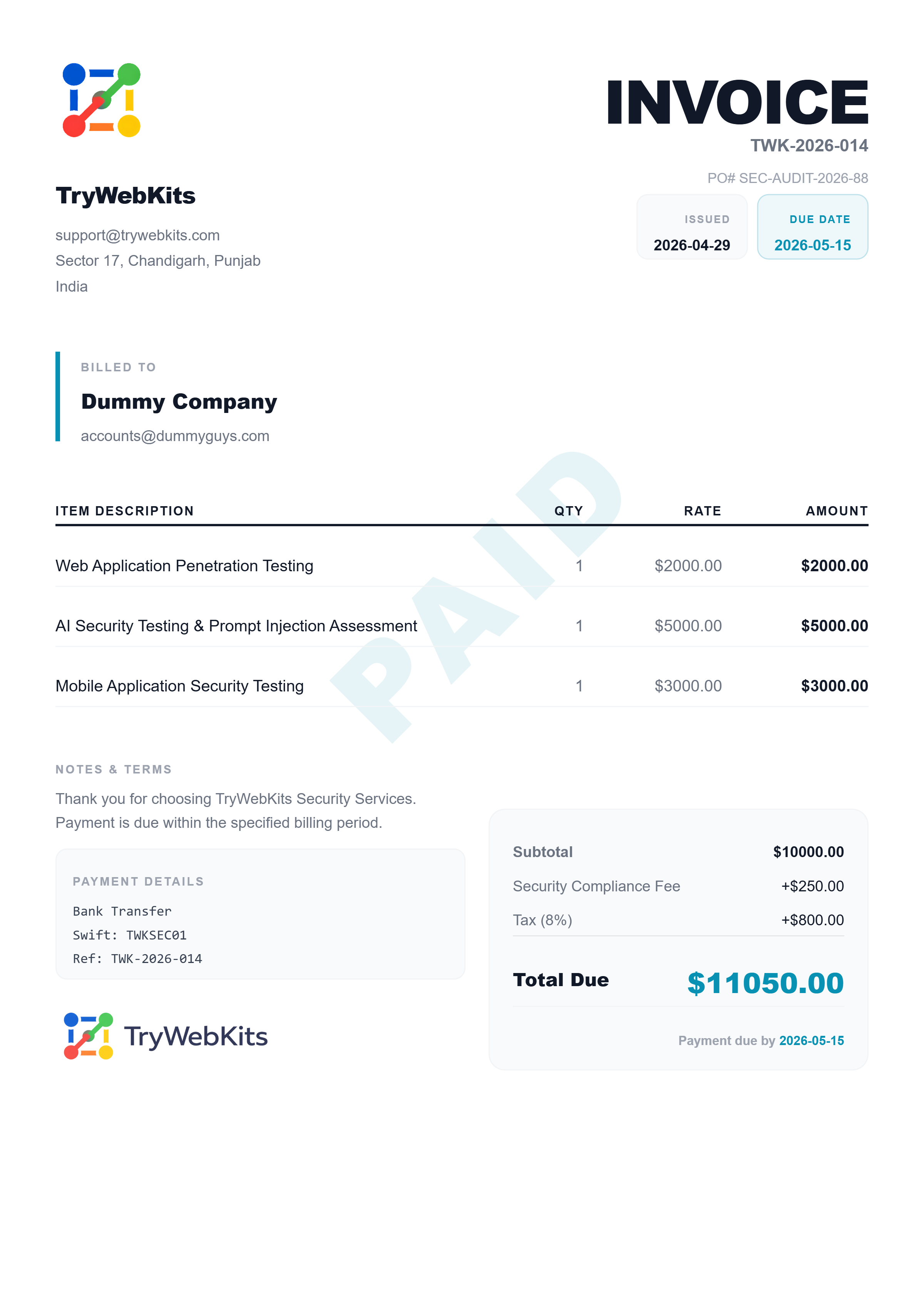
Quick Invoice Demo
See how easy it is to create invoices in a quick walkthrough.
Do Good Invoices Matter?
A quality invoice is more than a request for payment; it is a critical document reflecting a business operation's professionalism.
Invoices Shape Brands
Well-designed invoices reinforce a solid, organized business identity.
Invoices Create Trust
Clear documentation builds client confidence and ensures smooth transactions.
Invoices Show Value
Detailed line items help clients understand the scope and worth of services rendered.
Invoices Reflect Brand
Consistency in design and formatting strengthens recognition across all client communications.
Invoices Drive Image
Professional documentation sets a high standard for how the business operates.
Invoices Build Trust
Accuracy in figures minimizes errors and shows attention to detail.
Invoices Define Business
The quality of financial documentation speaks volumes about internal processes.
Invoices Speak Brand
A clear, organized statement communicates reliability without extra words.
Invoices Strengthen Brand
Providing complete and easy-to-read billing secures a positive final impression.
Must-Have Invoice Sections
Every invoice must clearly present specific information to be legally compliant and understandable for accounting. Understanding these key components is essential when preparing invoices forms or invoice generated online.
| # | - | Section | What It Must Include |
|---|---|---|---|
| 01 | Header and Identification | The term "Invoice" must be clearly visible, along with a unique invoice number, date of issue, and payment due date. | |
| 02 | Supplier and Client Details | Complete name, address, and contact information for both the issuer and the recipient of the billing document. | |
| 03 | Itemized List | A description of all goods or services provided, including unit cost, quantity, and the total cost per line item. | |
| 04 | Tax and Subtotal Summary | A breakdown of the total cost before any taxes or discounts are applied, followed by the specific tax amounts. | |
| 05 | Total Amount Due | The final, clearly marked monetary amount due, typically presented in bold text for immediate recognition. | |
| 06 | Payment Terms | Instructions on accepted payment methods, remittance details, and any penalties for late payment. | |
| 07 | Notes or Memos | Space for including thank-you notes, special instructions, or links for online payment. |
Key Features Of Our Invoice Generator
The online invoice generator simplifies creating documents with features focused on speed and correctness.
Add Business Logo
Use the invoice generator with logo feature to upload a company image, maintaining brand consistency.
Instant Calculations
All calculations, totals, and tax sums are performed instantly without manual entry mistakes.
Export Options
Download the finalized document as a PDF or spreadsheet file, compatible with major accounting systems.
Create Quote Template
Easily generate a comprehensive quote template and convert it directly into a final invoice.
Draft Storage
Keep works-in-progress secure for future changes, allowing quick modifications and updates.
Smart Taxes & Discounts
Stack GST, VAT, service fees, as fixed or percentage. Apply discounts before taxes. Every calculation is accurate.
Share as PNG Instantly
Export a high-res image to send directly via WhatsApp, iMessage, or email. No PDF viewer needed, clients see it immediately.
Why Choose Us?
Choosing a dedicated online invoice maker over traditional methods offers significant gains in time and accuracy.
Faster Billing
Filling out an existing invoice template by hand or in a spreadsheet is slow and prone to errors.
Polished Design
Generic spreadsheet tables lack the polished format and branding of a dedicated, high-quality invoice example.
Faster Than Spreadsheets
Subtotals, discounts, tax stacking, and grand totals are calculated automatically, eliminating manual formula errors.
Save & Resume Anytime
Download a JSON draft of your invoice and reload it later with one click. Never lose your work, even without an account.
Data Security
All invoice details stay private and are handled locally on your device. Nothing is collected, stored, or shared, giving you full control over your information.
Questions We Often Hear
This is a free invoice generator tool, providing complete functionality at no charge for everyone who needs it.
Yes. Both fields are independent. A logo appears at the top of the invoice; a stamp or signature image appears in the lower-left notes section.
The tool includes options for all global currencies, ensuring local compliance for international transactions.
The layouts cover all necessary sections required for standard business and freelance financial documentation.
There is no usage limit; individuals can create free invoice documents as often as necessary without restriction.
Yes, a dedicated section allows complete customization of payment due dates and accepted payment methods.
Yes. A discount is applied to the subtotal first, and any taxes or fees are then calculated based on the reduced amount.
Yes. The print option sends the invoice directly to the browser's print dialog, pre-formatted for standard A4 paper.
You May Also Like

Typing Speed Checker
Test and improve your typing speed with real-time WPM tracking

URL Unshortener
Instantly expand the shortened links before clicking them to protect yourself from malware and phishing.
CSV Viewer Online
View, search, edit and analyze CSV files and spreadsheets directly in browser.

Deep Work Timer & Tracker
An advanced highly customizable, deep work tracker. Track focus sessions with detailed analytics, and visualize progress.

Bionic Reading Converter
Improve reading speed & concentration by converting any text into Bionic Reading format
