Word Counter
Count words, characters, sentences, paragraphs, and lines as you type.
What Does This Word Counter Do?
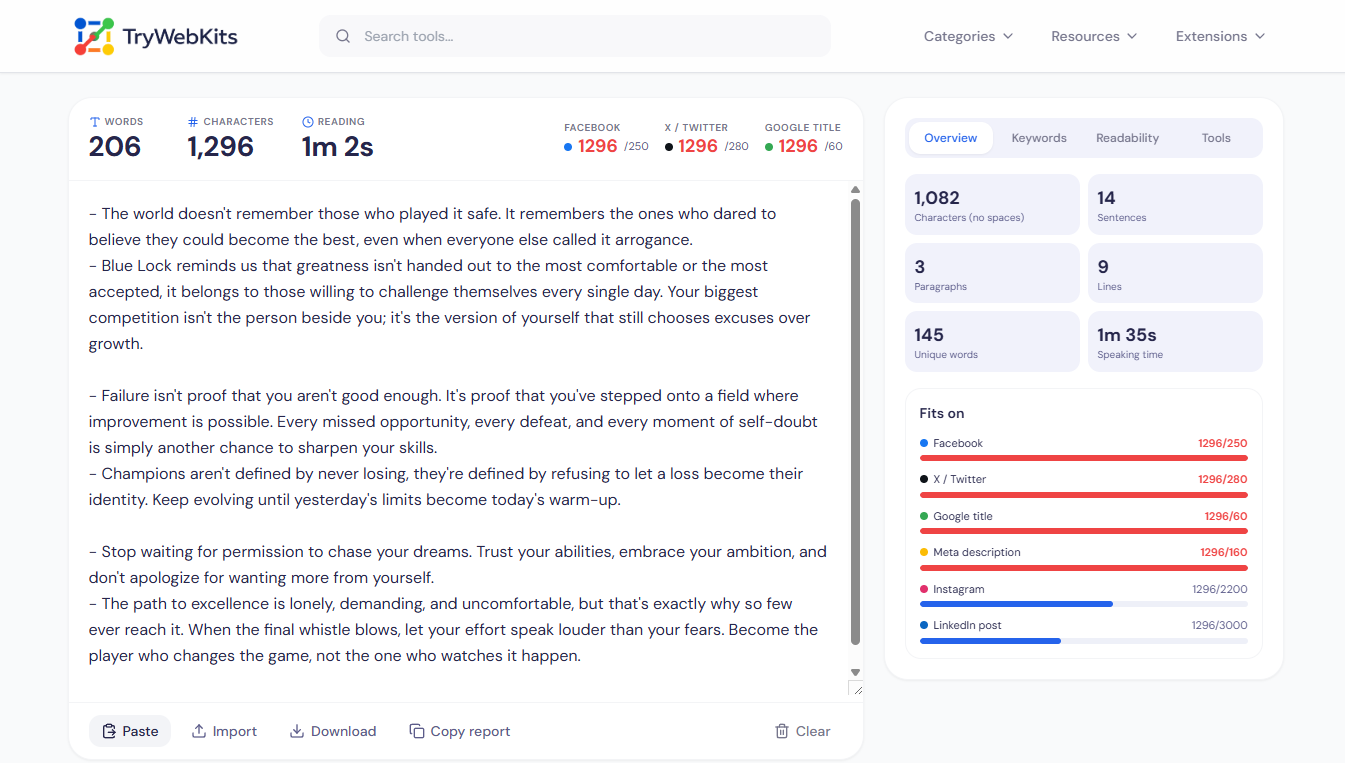
The Word Counter is a free online tool that measures text the moment it is typed or pasted. It counts words, characters with and without spaces, sentences, paragraphs, lines, and unique words, with every figure updating live and no button to press. The running total stays accurate even while text is edited mid-sentence. Because the whole tool works inside the browser, nothing is uploaded to a server and the text never leaves the device.
It loads quickly, handles long documents, and behaves the same across phones, tablets, laptops, and desktops, making a quick word count or character count available anywhere.
How To Use The Word Counter?
Getting a full text breakdown takes only a few steps.
- 1
Type directly in the box, or paste text to see counts appear instantly.
- 2
Watch every total update at the top as the writing changes.
- 3
Open the side tabs for extra metrics and built-in writing tools.
- 4
Copy a result, download the text, or clear the box to restart.
Who Benefits From This Word Counter?
A word counter helps anyone who works with text daily.
Students And Essay Writers
Track an essay word counter target and stay inside a strict word limit.
Content And SEO Writers
Check keyword counter data and length before publishing online.
Social Media Managers
Fit captions and posts within each platform’s character count.
Authors And Bloggers
Measure length across long drafts and keep chapters consistent.
Core Capabilities Of The Word Counter
The Word Counter goes well beyond a basic running total.
Platform Length Limits
See at a glance whether text fits X, Facebook, Instagram, Google titles, and meta descriptions.
Keyword Density
Find the most repeated words and two or three word phrases, filtering common words.
Readability Scores
Get a Flesch reading ease score, reading level, and U.S. grade for any passage.
Time Estimates
Estimate how long text takes to read aloud or silently at a chosen pace.
Writing Goals
Set a word or character target and watch a progress bar fill as text grows.
Built-In Text Tools
Change case, clean spacing, import files, and run find and replace in one place.
Why Choose This Word Counter?
Manual counting wastes time and often produces the wrong number.
Instant Accuracy
Every figure is exact and live, removing the guesswork of counting words by hand.
One Single Place
Many metrics sit on one screen instead of across several separate counters.
No Setup Needed
The tool opens in any browser with no account or install to manage.
Privacy & Security
Your data never leaves your browser. All processing is done locally, ensuring 100% privacy and security.
Frequently Asked Questions
Once the page has loaded, counting runs fully in the browser, so most features keep working even without an active internet connection.
Yes. The counter recognises letters and numbers from many languages, so word and character counts work for non-English text too.
Plain text and Markdown files under two megabytes can be imported directly, and the result can be downloaded again as a text file.
It focuses on counting and analysis, not corrections, though the browser’s own spell-check underline still appears inside the text box.
There is no fixed word limit. The counter is built to stay fast with long essays, articles, and full documents pasted at once.
You May Also Like

Text Case Converter
Convert text between uppercase, lowercase, title case, and more

Text Compare Online
Compare texts or files with our side-by-side diff checker.

Bionic Reading Converter
Improve reading speed & concentration by converting any text into Bionic Reading format

Upside Down Text Generator
Flip text upside down or reversed for social posts, comments, and informal content.

Invisible Character
Copy and paste blank text and invisible character for Instagram, games, and more.

Image Alt Text Generator
Generate descriptive SEO alt text for images with private on-device AI.
