Snapchat Story Generator
 Snapchat Story Generator
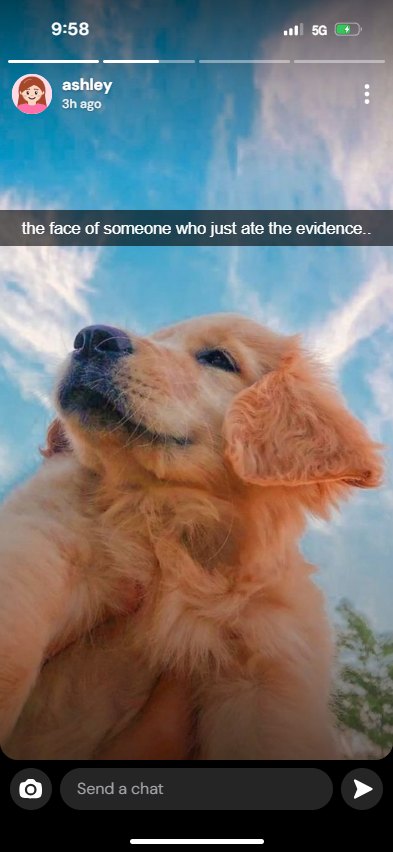
Create a realistic fake Snapchat story screenshot with an image, caption and name.
Drag and drop the story image here
JPG, PNG or WebP, up to 25 MB
Live preview. The download is a 1179 × 2556 px PNG image.
About This Tool
The Snapchat Story Generator makes a fake Snapchat story screenshot. The result looks like a real story on a phone, built from a few details typed on screen and saved as an image. No Snapchat account is involved, and nothing is posted or sent to anyone.
It suits memes and harmless jokes, ad previews, client mockups, storyboards, classroom slides and design presentations. Marketers and designers use it to see how a story will look on a phone before the real one is made. As a Snapchat story template, the same layout can be reused for a new image or caption in seconds.
How To Make A Fake Snapchat Story?
A finished story takes five short steps.
- 1
Open the Story tab and add an image, or pick one of the ready backgrounds.
- 2
Type a caption in the Caption tab, then slide it up or down the screen.
- 3
In the Account tab, set the name, the time ago and the avatar.
- 4
Use the Phone tab to pick an iPhone or an Android style screenshot.
- 5
Press Download PNG to save the story, or Copy image to paste it elsewhere.
Mistakes To Avoid While Making A Fake Snapchat Story
Small slips that give a story mockup away.
Blurry Images
A small image turns soft on a tall screen. A sharp, upright image looks right.
Captions Over Faces
A caption across a face or product hides the point. Lower placement keeps it clear.
Unreal View Counts
Huge view counts on a story posted a minute ago look odd. Modest numbers convince.
Copied Status Bars
A set of stories with one clock and battery looks staged. Small changes help.
Features Of This Snapchat Story Generator
Everything needed to make a story look real.
Two Story Views
Build a friend's story with the reply bar, or My Story with views and screenshots.
Three Caption Styles
Write the caption as a classic dark bar, big bold text or a rounded label.
Seven Caption Colors
Color big text and labels in white, black, yellow, red, blue, green or pink.
Image Fit Controls
Fill the screen or fit the whole image, then zoom and move it into place.
Ready Made Avatars
Pick one of six drawn characters, or add any image as the avatar.
Quick Time Picks
Set the story age in one tap: just now, 5m, 2h or 1d ago.
Editable Status Bar
Set the clock, battery level, signal bars and network shown on top of the screen.
Story Progress Bars
Show up to 12 snaps in the story and mark which one is playing.
Sharp PNG Download
Save a PNG up to 1179 × 2556 pixels, the size of an iPhone screenshot.
Why Use This Snapchat Story Maker?
Four things that set this tool apart.
Free To Use
Every option is free, with no sign up and no watermark on the image.
Images Stay Private
The story is built inside the browser, so an added image never leaves the device.
Live Phone Preview
Every change appears at once on the phone screen, so nothing is left to guess.
Works On Phones
The full editor fits a phone screen, and the saved image matches the desktop one.
Usage Policy
This site is not responsible for story images made by its users. By using the Snapchat Story Generator, every user agrees to act lawfully and ethically, including, but not limited to, following these rules:
- Generated story screenshots must never be used to harass, attack, threaten, slander, disparage, intimidate, or otherwise hurt any person or entity.
- Generated stories must never spread false information that could affect anyone's life in a negative way.
- Created stories must not be presented as real posts. The intent of the tool is harmless fun and honest mockups, not making it look as though someone shared something they never did.
- It must be made obvious to viewers that any story created here is not an original or genuine screenshot.
Snapchat is a trademark of Snap Inc. This tool is an independent mockup maker and is not affiliated with, endorsed by, or sponsored by Snap Inc.
Got Questions?
JPG, PNG, WebP and most other common image files can be added, each up to 25 MB. Very large images are scaled down to keep the tool fast.
The story screen takes a still image. A frame saved from a video can be added as an image to stand in for a video snap.
Each download is one story screen. A sequence is made by changing the image, the caption and the snap on screen, then downloading again for each one.
No. The view and screenshot numbers are typed in by hand for the mockup. Real viewer lists are only available inside the Snapchat app.
Text and settings are kept in the browser once cookies are accepted, so a draft opens again later. The added image is never stored and needs adding again.
You May Also Like

Instagram Story Generator
Create a realistic Instagram story mockup from the viewer or owner side and export as an image.

Instagram DM Generator
Create realistic fake Instagram DM screenshots, free, private, no watermark.

Reddit Post Generator
Create a realistic fake Reddit post with custom subreddit, votes, comments & awards.

Fake Tweet Generator
Create realistic fake tweets instantly for pranks or memes.